
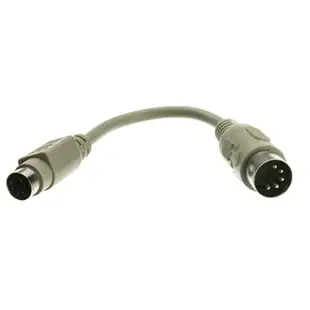
Connect an AT keyboard to PS/2, or a PS/2 keyboard to AT
Take the keyboard plug in your hand and identify its diameter and pin count. A full-size DIN 5 and a Mini-DIN 6 use different layouts. Starting with the keyboard in hand makes the direction of the adapter much easier to specify.
Which side needs a socket?
A keyboard with a five-pin AT plug needs a five-pin socket on the adapter. To connect it to a PS/2 computer, the other end must be the smaller six-pin plug. A keyboard that already has the PS/2 plug reverses this arrangement. Check that the computer and keyboard support the intended interface.
Allow space behind the computer
A short adapter lead can ease the turn behind a tower that sits close to a wall. Include its length and the keyboard’s fixed cable when measuring reach. A computer with only USB ports needs a different interface choice from these round keyboard adapters.
Check the computer model on a vintage keyboard project
An older keyboard may have a switch or model designation that identifies the kind of computer it was built to serve. Look up the manual for the specific keyboard as well as the host before choosing a passive AT-to-PS/2 adapter. If the manual mentions different operating modes, record the setting used on a known working system. When building a parts list for a museum or classroom, label the keyboard, adapter and host as a tested set. The description “five-pin keyboard” alone is much less useful to the person trying to reproduce that working arrangement a year later.
Which direction converts the plug I already own?
Put the loose keyboard plug beside a picture of the computer socket. A classic AT keyboard with a five-pin plug meets a five-pin female socket. The 10I5-013HF pairs that socket with a six-pin Mini-DIN male end. The 10I5-012HF has the opposite arrangement for a keyboard and host with the other combination. Verify the keyboard and computer use compatible signaling in addition to the physical match. A six-pin coupler such as 30I2-06700 joins compatible plugs belonging to the same connector family and cannot supply the five-pin connection required here.
Will the keyboard be shared through a KVM?
A keyboard adapter intended for a directly connected computer may also have to pass through a KVM switch on a restoration bench. Identify which side of that switch receives the keyboard and which cable bundle runs to the computer. Check the switch maker’s supported keyboard types and any handling procedure for changing connections. Compare the proposed setup with one known working direct connection first, if the hardware permits it. If the keyboard operates directly but fails through the switch, the extra device and its cabling deserve separate attention. The same five- and six-pin ends do not prove the entire chain supports that keyboard.
Compare parts for your setup
PS/2 to AT Keyboard Adapter, MiniDin6 (PS/2) Female to Din5 (AT) Male, 6 inch
10I5-012HF
- Connector references
- MiniDin6
- Dimensions in listing
- 6 inch
PS/2 Coupler / Gender Changer, MiniDin6 Female to MiniDin6 Female
30I2-06700
- Connector references
- MiniDin6 Female
AT to PS/2 Keyboard Adapter, Din5 (AT) Female to MiniDin6 (PS/2) Male, 6 inch
10I5-013HF
- Connector references
- MiniDin6
- Dimensions in listing
- 6 inch


