
Fit a phone holder or choose tools for a small device
A phone that slides around during a video call needs a different accessory from a phone awaiting a repair. This collection includes mounts and precision tools, so start by describing the job and the surface or device the accessory must fit.
Will the holder fit with the case on?
Measure the phone’s width and thickness with the usual case fitted. For a cup-holder mount, measure the available opening and check where the phone will sit after adjustment. Make sure a charging plug can reach the socket and that the clamp avoids the side buttons.
Choosing a repair set
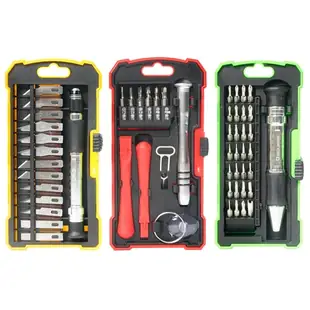
Use the equipment maker’s service guide to identify the screw profiles and tools required for the intended repair. Compare those individually with the kit contents. The advertised piece count can include multiple tips, handles and other accessories that serve different steps.
Setting up a phone for regular product photos
A seller photographing items for an online listing needs the phone to return to roughly the same position between shots. Before choosing a mount, place the phone where the item fills the frame and check how far the support must reach. If you shoot overhead, confirm that the holder is intended for that orientation and can hold the phone with its normal case. Look for clearance around the lens, then check whether touching the shutter rocks the image. A holder that suits a dashboard may have the wrong base or adjustment range for use on a counter.
Recording a hands-free demonstration with a phone
Set the phone on the counter where the demonstration will take place and frame the object you need viewers to see. A flexible mini tripod such as C2004 may solve the framing problem without asking a coworker to hold the phone. Check the dimensions of the clamp against the phone with its case fitted and allow access to the charging port in the orientation you plan to use. Try one complete movement on camera. Being able to show both hands clearly may matter more than the tripod's height in a still product photograph.
Can a passenger use the holder without blocking the controls?
For a cup-holder mount, sit in the parked vehicle and place the phone roughly where the arm would hold it. Check the reach to the gear selector, climate controls and other equipment with the phone mounted in both orientations. If the mount has an adjustable base, compare its published range with the shape of the actual cup recess, including any narrow bottom section. Decide whether the charging cable can stay clear of moving controls. Checking the position while parked can reveal that a holder which fits the cup opening perfectly still puts the phone in an impractical location for that vehicle.
Compare parts for your setup
3-pack Hobby and Repair Set. 17-piece Smart phone repair kit. 28-piece Precision screwdriver set. 13-piece Hobby knife set
9005-10130
- Package quantity
- 3-pack · 17-piece · 28-piece · 13-piece
Choose a fitted screen protector for a specific handset or a mount for hands-free viewing at a desk. The pack contains 3 pieces; count the parts required per installation.
32-Piece Mobile Device Repair Kit
9005-10140
- Package quantity
- 32-Piece
Choose a fitted screen protector for a specific handset or a mount for hands-free viewing at a desk. The pack contains 32 pieces; count the parts required per installation.


