
Choose phone and tablet accessories for the way you actually use them
The cable in your car charges your phone. At a desk, you plug it into a computer to copy photos and nothing appears. On the next trip, your earbuds play music but callers cannot hear you. “Phone accessories” can mean power, data, playback or a microphone. Pick the job first and write down the exact phone, tablet, charger and accessory you intend to use together. The same phone can need several different cables over a working day.
Why does my phone charge but fail to transfer photos?
Match both ports and look for a cable that explicitly supports data. A wall charger supplies power. A computer connection also needs a data-capable port and the right device setting or permission. Google recommends unlocking an Android phone and selecting file transfer in its USB options. Try a known data cable directly between phone and computer before adding a dashboard socket or hub. As a practical check, copy a single picture you can identify. A charging icon only tells you that power is reaching the phone. If you need to move a large video library routinely, compare the data speeds supported by your phone, cable and computer.
Which charging cable goes in my travel bag?
Make a list of the ports you can count on at the wall charger, in the car and on a power bank. An older USB-A outlet and a new USB-C charger take different plugs at the power end. Atlas carries Lightning, Micro-B and USB-C cables for different devices. For example, 10U2-05103WH is a three-foot USB-to-Lightning charge and sync cable. The USB-A-to-USB-C lead 10U2-32101 has a listed 480 Mbps data rate and 15-watt rating. For a fast-charge requirement, check the charging standard supported by the phone, the chosen charger output and the cable rating. Read the combined output rating if two passengers will share the charger.
How can I keep the microphone working with headphones?
Start with the jack or adapter on the device that will handle the call. A stereo auxiliary cable carries left and right playback. A compatible headset arrangement also needs a microphone path. The slim 10A1-02103 stereo lead is useful between compatible audio jacks, while 10A1-40206 is described as a four-contact TRRS stereo-plus-microphone extension. Check headset wiring and device support before choosing it. If you prefer Bluetooth, look for the built-in mic in the accessory description and make a short test call. Pairing for music and selecting the call input are distinct steps.
Can I choose a length that works in the car and at home?
Measure from the outlet to the phone holder with the phone in its case. A plug with a wide molded head may catch on the opening in a thick case. At a desk, leave enough reach to pick up the phone during a call. For a car, route loose cable clear of the pedals, controls and driver's view. Keeping a shorter dedicated cable in the car often makes more sense than moving the same long lead between both places every day.
Compare parts for your setup
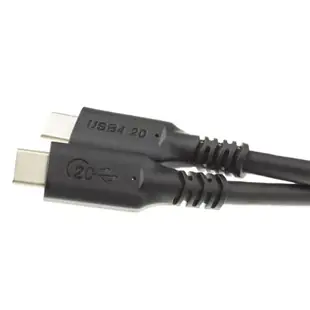
USB4 20Gbps 100 watt Fast Charging Cable, USB Type C Male to Male, PVC Jacket, 6 foot
10U4-32006
- Connector references
- USB Type C Male
- Data rate
- 20Gbps
- Power rating
- 100 watt
- Length
- 6 ft
Consult both the host and accessory specifications for video output, charging direction and data rate. Measure the installed route against this 6 ft length.
Flexible In-Ear Buds w/ In-Line Mic, Sports Ear Clip, 3.5mm, Green
5002-125GN
- Dimensions in listing
- 3.5mm
White Decora Style Duplex AC 15A 125V Outlet (2 x Nema 5-15R) Featuring Dual USB charge ports providing 4.0 Amps ( USB A Female 2 A each)
90W1-70100
- Connector references
- Nema 5-15R · USB A Female
- Configuration
- Duplex
- Current rating
- 4.0 Amps
- Voltage
- 125V


