
Choose a phone cable that will also transfer your files
A phone that lights up when plugged into the computer has established a power connection. If the goal is moving photos, look for a cable explicitly rated for data and identify the port on the computer as carefully as the one on the phone.
Which cable belongs in the bag?
A rectangular USB-A charger and a newer oval USB-C laptop may require different host ends for the same phone. The listings span Micro-B and Type-C combinations as well as different data and power ratings. Check whether the length you want carries the rating you need on its own part page.
If charging works but photos do not appear
Unlock the phone and review its prompts for trusting the computer or permitting file transfer. Try a direct port and a cable known to transfer data on that device. This comparison separates cable capability from a permission prompt or a problem specific to a dock.
Why two cables can behave differently in the car
A cable can charge the same phone from the dashboard yet behave differently when you try to use a wired infotainment connection. Identify the particular vehicle USB port intended for data. Some vehicles also have other charge-only ports for passengers. Check the vehicle and phone documentation for supported connection modes and cable requirements, then test with the phone unlocked and its original data cable if available. If the known working cable succeeds on that same port, compare the new cable’s connector fit and data capability. Record the cable that works before ordering a second one for another vehicle.
Sorting the cables that charge a phone but fail a file transfer
Create a small test folder on a device you control. Connect directly to the computer with a cable documented for data, unlock the device and select the appropriate transfer mode if prompted. Try the same folder and host port with the suspect lead. The 10U2-03101BK is a short USB-A to Micro-B cable for a device with that older port. The 10U3-31100.5 has USB-C at both ends and a separately stated data rating. Label a cable only after you know the connector pair and operation it supported in your test.
Does the charging stand leave enough cable clearance?
When a phone sits upright in a cradle, the cable may enter through a narrow cutout in the bottom. Measure the molded plug body, the depth of the phone case and the room below the cradle for the cable to turn. A cable with the correct electrical specification can still fail to seat completely if the plug shoulder hits the stand. With the phone removed from the stand, test the same connection to the computer and copy a small file. If it works on the desk but drops out when docked, compare the physical fit before assuming that the data rating or the phone software is at fault.
Compare parts for your setup
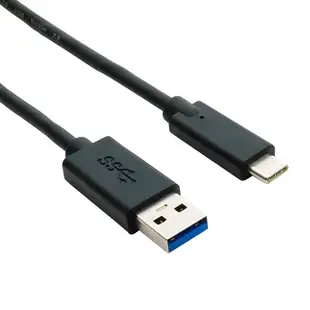
USB 3 - 5Gbps 10-watt - Type A male to C male Cable, Charge & Data Sync, 1 foot
10U3-32001
- Connector references
- Type A male
- Data rate
- 5Gbps
- Power rating
- 10-watt
- Length
- 1 ft
Check connector type, data support and charging rating separately for the exact item. Measure the installed route against this 1 ft length.
Apple Lightning Authorized Black iPhone, iPad, iPod USB Charge and Sync Cable, 3 foot
10U2-05103BK
- Length
- 3 ft
Check connector type, data support and charging rating separately for the exact item. Measure the installed route against this 3 ft length.
USB C to Lightning, Fast Charge & Data Sync Apple Products, White, 3 foot
10U2-25103
- Connector references
- USB C
- Dimensions in listing
- 3 foot


