
Connect headphones to a phone with or without a headset jack
An aux cable for a car, a headset extension and wireless earbuds can all put phone audio where you want it. Start with the device receiving the sound and decide whether a microphone or inline controls must work through the same connection.
Choose the ends for the route
A male-to-male stereo lead joins compatible sockets. A male-to-female extension accepts an existing headphone plug. Compare the plug contacts and the specified microphone support when buying for calls. Check the headphone case opening and the phone case cutout for enough space around the plug body.
Where does the microphone live?
Record a voice memo as a quick test. Move the phone away while speaking into the headset and listen to the result. If the recording seems to come from the handset, check the adapter specifications and the selected input before assuming the headset itself has failed.
When a wired connection cuts out in a pocket
A thick phone case or a narrow cutout can stop the plug shoulder before the contacts are fully seated. With the phone stationary, compare playback with and without the case if the manufacturer’s instructions permit it. If the connection works only without the case, measure the cutout and look at the molded body of a slim plug. If moving the cord changes the sound with the phone out of its case too, test another known working headset without adding an extension. These two observations help narrow a purchase to the plug shape, headset or extension that actually needs attention.
Turning an old pair of earbuds into a travel spare
Take the phone, its normal case and the exact earbuds you want to keep. A slim stereo lead such as 10A1-02103 ends in two 3.5 mm plugs and can join compatible stereo sockets. It cannot provide a USB-C socket or add a microphone path to a stereo-only setup. If you need a headset for calls, 5002-111BK is an example with USB-C and a listed mic. Check both music playback and a voice recording before packing the set. An adapter that fits on a bare phone may also sit shallow when a thick case is installed.
Sending directions to a car stereo
A car stereo with an AUX input usually expects an analog audio signal at that jack. Confirm the input type in the vehicle manual, then look at the phone’s available output. If the phone uses USB-C or Lightning and has no headphone jack, check the exact phone model’s supported audio adapters before ordering a plain stereo lead. Select AUX in the stereo and try a familiar audio clip while parked. If the car separately handles calls by Bluetooth, check the call routing independently. Hearing music through the cable establishes a playback path but does not identify which microphone will be used for a call.
Compare parts for your setup
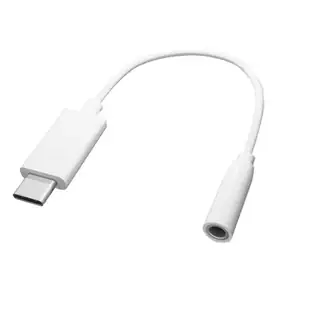
USB C to 3.5mm Adapter Cable for connecting headsets, 5 inch, White
30U2-35000
- Connector references
- USB C
- Dimensions in listing
- 3.5mm · 5 inch
Flexible In-Ear Buds w/ In-Line Mic, Sports Ear Clip, 3.5mm, Green
5002-125GN
- Dimensions in listing
- 3.5mm
Bluetooth Wireless Headphone w/ Built-in Microphone, Adjustable Headband, Black
5002-33200
- Configuration
- Built-in Microphone


