
Will a Cat8 patch cable change my network speed?
The useful starting point is the interface on each device. A short Cat8 lead may suit a specified high-speed copper connection. A router or laptop with a slower Ethernet interface still negotiates within its own capabilities.
Does the part come with two RJ45 plugs?
The selection includes molded S/FTP patch leads and separate shielded keystone hardware. Confirm the item type and the finished length. Measure the rack path and check whether the boot and jacket can clear the surrounding ports and cable management.
What do I compare for a high-speed design?
Match the intended Ethernet application, channel length and termination system to the equipment and cabling specifications. If the design calls for a particular category test, record the result for the full installed connection before attributing any transfer-speed issue to the patch lead.
What if the order is really for a speed complaint?
Ask which speed is slow: the Ethernet link reported by the switch, a transfer to local storage or an internet download. Record those separately. A new Cat8 lead can replace a suspect patch cable while leaving an upstream internet-plan or storage limit entirely unaffected.
Check the two ends of a high-speed short link
For a rack-to-rack link, read the exact port type and mode on both devices. Some high-speed interfaces take optical modules or direct-attach assemblies, while others accept a copper modular plug. Choose a Cat8 cord only after confirming the appropriate copper ports and channel design. The six-inch 13X8-52100.5 is listed as a shielded RJ45 patch cable. Its advertised cable capability does not upgrade a slower network interface. Measure bends at each device, inspect the space around the boot and verify negotiated operation after fitting. Document the port pair as well as the cable part number.
Does a slower negotiated rate mean the Cat8 cord failed?
Read what each network port supports before interpreting its status screen. A high-specification cord between two gigabit devices can be working correctly when both report gigabit operation. To investigate an unexpectedly slow link, identify the precise Ethernet modes supported by the two interfaces, then note their settings and any intermediate panel or coupler. Substitute a proven cord of appropriate specification on the shortest practical direct path. If the direct test works but the installed path does not, the wall link or an intermediate connection deserves examination. If the devices never advertise the target mode, a different cord alone cannot provide it. When buying spares for a short high-speed rack connection, label them with the verified equipment use. A general “fast Ethernet cord” label is too vague for a shelf holding several types of assemblies.
Compare parts for your setup
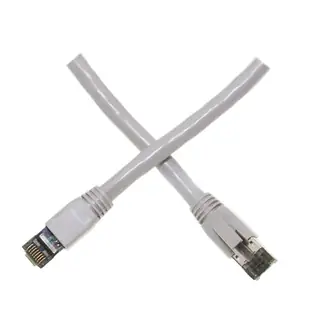
Cat8 Gray S/FTP Ethernet Patch Cable, Molded Boot, 40Gbps - 2000MHz, 4-Pair 24AWG Copper, RJ45 Male, 6 inch
13X8-52100.5
- Connector references
- RJ45 Male
- Ethernet category
- Cat8
- Data rate
- 40Gbps
- Wire gauge
- 24AWG
Use the 6 in lead between nearby switch and patch-panel ports; measure the path through the cable organizer first.
Match the shielded cord to the grounding and shielding design of the installed channel and check both port speeds.
Shielded Cat8 Keystone Jack, 40Gbps, Toolless, RJ45 Female
33X8-530
- Connector references
- RJ45 Female
- Ethernet category
- Cat8
- Data rate
- 40Gbps
Blank Keystone Insert, Black
321-120BK
- Configuration
- Blank
Cover a spare position now and leave room for a future connection.
Check whether the opening needs a whole plate or a single insert, then match the mounting format.


