
Buy the network or telephone part at the point where the connection breaks
A desk phone works but the computer beside it negotiates a slow wired connection. A camera powers on beside the switch and drops out when you move it to the entrance. These jobs can involve a wall plate, a patch cable, an adapter and a switch, all within a few feet of each other. Trace one complete path from the device to its destination. The labels on the two active ports will narrow the search more quickly than choosing the highest category cable on the page.
Which Ethernet cable belongs at my desk or in a rack?
A finished patch cable connects two existing jacks, often a computer to a wall outlet or a patch panel to a switch. Measure the route around the desk or rack rail and leave enough room to disconnect the plug. A snagless boot can protect its latch when you pull the cable past other leads. A slimmer boot or bootless plug can be easier to reach in a closely packed row. Bulk cable makes sense when installing a run with separate terminations. Confirm conductor type, gauge and jacket requirements with the installer and select plugs or jacks compatible with that actual cable.
Why does the link still show 100 Mbps?
Check the speed of the adapter, both switch ports involved and the device at the other end. The Atlas 30U2-31000 USB Ethernet adapter is listed for 10/100 Mbps. An Ethernet cable change cannot raise that adapter's link above its rated speed. Part 30U3-30010 is a USB-C Gigabit Ethernet adapter for a compatible host. If both ends support gigabit, try a short known-working patch cable directly into the switch. Then restore the wall run and each patch lead in turn. Note the negotiated wired link separately from an internet speed test, which also depends on the service and the path beyond the switch.
How many cameras can a PoE switch power?
Record the power standard and maximum demand of each camera, access point or phone. Check both the maximum per port and the total power budget across the switch. For example, 71X6-00308 lists 15.4 watts per port and 61.6 watts total across eight ports. Eight devices each requiring the full per-port figure would exceed that budget. The similarly named 71X6-00408 lists 123.2 watts total. Compare like-for-like power ratings at the switch and confirm device compatibility before deciding which model fits. A plan that powers today's four phones may need extra capacity for a camera added later.
What if the wall jack serves a telephone or console?
Read the label at both ends and find what the building cable connects to. Phone lines, Ethernet network links and equipment console ports have different purposes. A modular plug's shape alone tells you little about the service behind a wall plate. An ADSL filter, a telephone cord and a USB-to-router console cable solve very different problems. Identify whether you need a voice line, a network connection or local equipment management. For a shared office, label the verified wall jack and its panel or switch port while you have access to both ends.
Compare parts for your setup
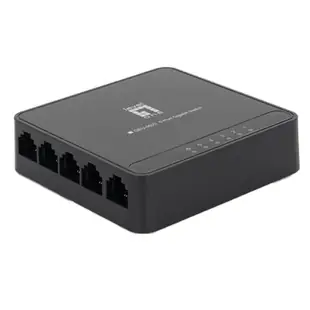
5 Port 10/100/1000 Gigabit Ethernet Switch, Black, Energy Efficient Ethernet / IEEE 802.3az Support
71X6-01305
- Data rate
- 1000 Gigabit
- Port count
- 5 Port
Simply45 Shielded Cat5e RJ45 Crimp Connectors, internal ground, Solid 24AWG/Stranded 28-26AWG, Blue Tint, Jar 50 pieces
S45-1050
- Connector references
- RJ45
- Configuration
- internal
- Ethernet category
- Cat5e
- Wire gauge
- 24AWG · 28-26AWG
Choose a compatible plug and boot when preparing patch leads for a wiring cabinet. The pack contains 50 pieces; count the parts required per installation.
Slim Cat8 Orange S/FTP Ethernet Patch Cable, Molded Boot, 40Gbps - 2000MHz, 6mm OD, 4-Pair 28AWG Copper, RJ45 Male, 6 inch
13X8-63100.5
- Connector references
- RJ45 Male
- Ethernet category
- Cat8
- Data rate
- 40Gbps
- Wire gauge
- 28AWG
Use the 6 in lead between nearby switch and patch-panel ports; measure the path through the cable organizer first.
Match the shielded cord to the grounding and shielding design of the installed channel and check both port speeds.


