
Choosing a loaded or blank patch panel for a network closet
List the wall outlets to be labeled and the points where cable enters the rack. A patch panel makes an organized handoff between building wiring and removable patch cords. It does not provide network switching by itself.
What comes in a blank keystone panel?
Count the open positions and order matching modules for the cable types you need. A loaded panel comes with a particular connector system, while a rack bracket may supply only mounting hardware. Read the product’s contents before treating every listed port as an installed jack.
What will a technician need to service the panel?
Measure rear access, planned rack units and the space for supported cable bends. Map room numbers to the port labels and reserve space for known additions. Keep a record of each completed cable test against those labels.
How should mixed copper and fiber outlets be mapped?
Give every port a unique identifier and record the interface installed in it. The numbered position on a blank panel does not indicate what is connected behind it. This matters particularly when staff request a patch lead remotely and can see only the label, not the jack or fiber coupling.
Distinguish voice blocks from Ethernet patch panels
A closet plan may use the word panel for more than one piece of equipment. The 50X1-02566 is a 66 punch-down block, a reference often encountered in telephone work. Before ordering a replacement, identify the cable type, termination method, intended signal and the front connection used by the technician. For an Ethernet patch panel, confirm category, port count, jack format, shielding and rack space. Match room labels to panel positions and reserve documented spare positions for future drops. A legible port schedule can be as useful at turnover as the box of patch leads.
Loaded panel, modular frame or enclosure with empty positions?
A rack drawing with twenty-four numbered connections does not specify what arrives in the shipping box. A loaded copper panel can include the jacks. A modular frame accepts separately selected inserts. A fiber enclosure can require fiber adapter plates or cassettes plus the termination hardware behind them. Part 61F1-01000, for example, is a 1U enclosure described with three plate or cassette openings. Ask the supplier to identify which positions arrive populated and what is needed to make the first live link. Include blanks for any unused positions the design calls for and reserve the planned expansion capacity. For mixed media, draw the room assignments and connector types on a front elevation. The installer can then match each labeled cord to an actual terminated port instead of discovering that the ordered hardware is only an empty frame.
Compare parts for your setup
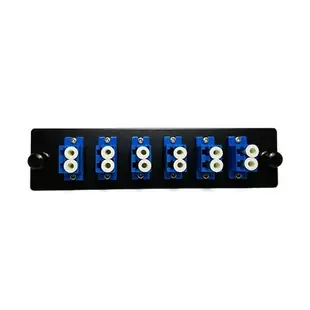
Fiber Distribution Panel Plate with 6 Blue LC/UPC Duplex Ports, Single Mode
61F2-01006
- Connector references
- LC/UPC
- Configuration
- Duplex
- Fiber specification
- Single Mode
Adjustable Standoff Bracket, 3U, Dimensions: 5.25in (H) x 1in (W) x Adjustable 3.5-6in(D).
68BP-50003
- Mounting
- 3U
- Dimensions in listing
- 5.25in · 1in · 6in
Mini Wall Mount 12 Port Cat6 Patch Panel, 110 Type, 568A & 568B Compatible, 10 inch
69BK-16012-10
- Ethernet category
- Cat6
- Port count
- 12 Port
- Mounting
- Wall Mount
- Dimensions in listing
- 10 inch


