
Will the network equipment and rack hardware physically fit?
A switch may fit a nominal rack width and still leave too little room for power plugs, patch leads or the rear door. Measure usable depth, rail position and free rack units for the exact equipment going in.
Which screws, shelves or brackets belong together?
The section includes rack screws, cabinets and standoff brackets. Identify whether the rail uses a particular threaded hole or a cage-nut system. Verify depth and load requirements with the equipment and rack manufacturers, including the mounting orientation of any wall bracket.
What makes a rack easier to maintain?
Mock up the port side, power side and cable exit before mounting. Check that staff can reach the release tabs, read labels and open covers. Record the rail hardware type so the next switch installation does not stall over a small fastener.
Do I need a cabinet or just a bracket?
A shallow panel with occasional front access may call for a different mount than a powered switch with rear connections and ventilation requirements. Obtain the dimensions and service access for each item. Check the complete footprint against the closet wall or floor before choosing the mounting hardware.
Buy the hardware that matches the existing rack rails
A new switch may fit the standard rack width while the mounting screws in the drawer have the wrong thread. Identify whether the rails have threaded holes or square holes requiring compatible hardware. The 30D1-04250 is a pack of fifty 10-32 rack screws with washers. Compare this with the actual rails and the equipment manufacturer’s mounting instructions. Count mounting points by device and check depth for the chassis, plugs and ventilation. Record the occupied rack units and leave room for cable management. A detailed hardware line on the order is easier than finding the missing parts on installation day.
A free rack unit can still be unusable
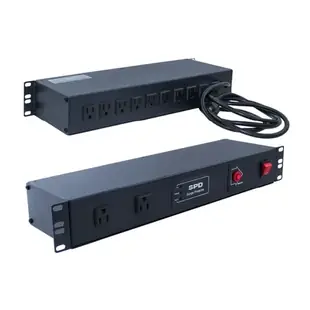
Measure three clearances independently: front-to-back equipment depth, space beyond the rear connectors and the swing of the front or rear door. A shallow wall rack can have several free units while lacking room for a switch’s rear power plug or the bend of an optical cord. A front elevation alone hides this problem. For a 1U power distribution unit, confirm outlet orientation, input cord access and the distribution design with the equipment owner. A blank spacer occupies rack space but provides no additional mounting depth. If a shelf is proposed for a desktop device, compare shelf load capability, usable depth, ventilation and retention. Mock up the deepest component and its actual leads before moving the existing rack contents. It is much easier to revise the placement diagram than to discover the door will not close after repatching every port.
Compare parts for your setup
19 inch 1U Rackmount 12-Outlet Power Distribution Unit (PDU), Power Strip, metal housing, 15A with 6.5ft Power Cord
51W2-21506
- Configuration
- 12-Outlet
- Current rating
- 15A
- Mounting
- 1U
- Dimensions in listing
- 6.5ft


