
Keep a parallel printer working when the original cable goes missing
A dot-matrix printer can still produce the multipart forms that keep a shipping counter moving. When a desk move separates it from its cable, the most useful search starts at the printer itself. Find its model and read the input label on the rear panel. Photograph the host port too. “Parallel printer cable” covers several distinct connector combinations, and a cable for a modern USB printer is another purchase altogether.
Which 36-contact printer plug do I have?
A common IEEE-1284 printer cable has a DB25 male connector for the host and a full-size Centronics 36 male connector at the printer. Atlas part 10E2-01106 is a six-foot example. Some printers take the smaller high-density 36-contact style. Part 10E2-02106 is an A-to-C cable with a DB25 male end and an HPCN36 male end. Two descriptions can both say “36 pin” and refer to entirely different shells. Compare the actual face, outside width and retention hardware with the printer's port illustration. Keep the model suffix in your notes because an optional interface board may be installed.
Does the computer still have a parallel port?
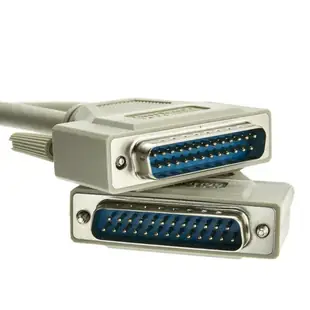
Read the label and check the computer or add-in card documentation. A 25-contact D-shaped connector also appears on serial equipment. If your application expects an LPT port, identify the actual host interface and confirm how the software selects it. The catalog includes DB25-to-DB25 A/A leads as well as printer-ended assemblies. A male-to-female example, 10E2-05206, provides a different physical connection from the DB25-to-Centronics cable. An extension only helps when the existing lead, port type and wiring already match the job.
Can I print from a newer computer?
A USB-to-parallel printer adapter includes electronics that present the printer to the computer. Check its connector, operating-system support and intended use. Printer driver availability remains a separate question, especially for forms, specialized labels or legacy accounting programs. A printer adapter designed to submit print jobs may not support an application that accesses hardware port registers directly. A parallel print server is another option in a shared office. Atlas lists 74X5-04112 with a parallel printer port and a 10/100 Ethernet connection. Check the supported printer, network printing method and driver with the server documentation before choosing that route.
What should I try before buying a longer lead?
Run the printer's own self-test using the procedure in its manual. A clean self-test gives you a reference when you reconnect the computer. Print a short document directly, then test the specific forms, labels and status reporting the workflow requires. Measure around the desk, including room to operate paper trays and fasten the connector. If a longer cable only becomes necessary because the computer has moved across the office, compare that path with placing a compatible print server beside the printer. Keep the known-working cable, driver name and successful port setting together for the next move.
Compare parts for your setup
Bidirectional Printer Cable, DB25 Male, 18 Twisted Pairs, A/A Type, 6 foot
10E2-05106
- Connector references
- DB25 Male
- Length
- 6 ft
Distinguish a DB25 parallel port from a similar-looking serial port and match the plug at the printer. Measure the installed route against this 6 ft length.
Bidirectional Printer Cable, DB25 Male to Centronics 36 (CN36) Male, IEEE-1284, 18 Twisted Pairs, 6 foot
10E2-01106
- Connector references
- DB25 Male · Centronics 36
- Length
- 6 ft
Identify both connector styles, including whether the printer takes a full-size or miniature Centronics plug. Measure the installed route against this 6 ft length.
Parallel Cable, DB25 Male to HPCentronics 36 (HPCN36) Male, 18 Twisted Pairs, A/C Type, 3 foot
10E2-02103
- Connector references
- DB25 Male
- Length
- 3 ft
Identify both connector styles, including whether the printer takes a full-size or miniature Centronics plug. Measure the installed route against this 3 ft length.


