
Reconnect a parallel printer and recover its status messages
A printer may still produce a test page while the computer never sees a paper-out message. Before changing the driver or ordering a cable, determine which connection the printer manual expects for communication in both directions.
Inspect the printer end separately
A common arrangement joins the computer’s DB25 connector to a 36-contact Centronics interface on the printer. Other listed leads have DB25 ends for different setups. Check the clips on the printer side, the screws on the computer side and the cable type specified for that printer model.
Check the route the driver actually uses
A USB-to-parallel adapter, mechanical switch or print server can add another compatibility question, particularly if software depends on port-level control. Where available, try a known working direct parallel connection with the same printer and driver. Note whether printing, status reporting or both fail.
A printer shared by an old workstation and a new laptop
Before discarding the original cable, print the same small file from the older workstation and record whether its driver also retrieves status. Then write down how the new laptop would reach the printer, including any USB adapter or network print server. Ask the adapter maker whether it supports the specific printer model and the functions you use, particularly status or maintenance operations. A successful internal test page tells you the printer can make marks on paper but skips both host paths. Keeping the original working route for comparison makes it easier to identify which new component actually needs changing.
The legacy printer prints a page but its status never changes
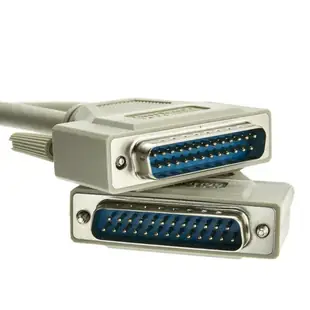
Note exactly what the application reports. Printing characters demonstrates that some traffic reaches the printer. It does not show that the full status and handshake path is working. Check the port mode, driver and the printer's stated cable type. The 10E2-05106 is a six-foot A/A bidirectional lead with DB25 male ends. If the printer has a wide Centronics-style socket, that particular cable has the wrong printer end. Test the status function with the shortest known-working configuration before putting an extension or manual switching unit back into the path.
What if the printer is at the far end of a counter?
A service counter might move the printer farther from the workstation to make room for a payment terminal. Before ordering the longest parallel cable in the list, consult the printer documentation for its recommended cable type and length. Measure around the counter edge and through the actual cable opening. A Centronics plug with its metal shell and retaining features may need a larger passage than the cable itself. If the complete connector cannot pass without taking furniture apart, plan the physical route with the installer. If the supported cable length is too short for that route, investigate the printer’s documented alternatives before moving it.
Compare parts for your setup
Bidirectional Printer Cable, DB25 Male, 18 Twisted Pairs, A/A Type, 6 foot
10E2-05106
- Connector references
- DB25 Male
- Length
- 6 ft
Distinguish a DB25 parallel port from a similar-looking serial port and match the plug at the printer. Measure the installed route against this 6 ft length.
Bidirectional Printer Cable, DB25 Male to DB25 Female, 18 Twisted Pairs, A/A Type, 6 foot
10E2-05206
- Connector references
- DB25 Male · DB25 Female
- Length
- 6 ft
Bidirectional Printer Cable, DB25 Male to Centronics 36 (CN36) Male, IEEE-1284, 18 Twisted Pairs, 6 foot
10E2-01106
- Connector references
- DB25 Male · Centronics 36
- Length
- 6 ft
Identify both connector styles, including whether the printer takes a full-size or miniature Centronics plug. Measure the installed route against this 6 ft length.


