
Choose the serial lead between a PC and an external modem
An external modem from a storage shelf may still have its telephone cord but lack the cable that connects it to the computer. Identify the modem’s serial interface separately from its telephone jack. Record the connector on the computer’s COM port as well.
Check which end faces the PC
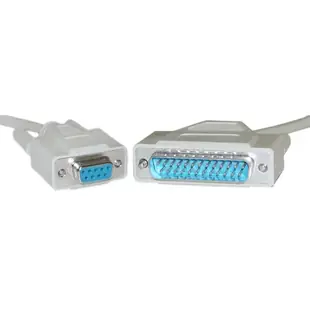
The assortment includes DB9 female to DB25 male leads. Check the modem’s wiring requirements in its manual, including any hardware flow control signals. A null modem cable is designed for another signal arrangement and can have the very same connector sizes.
Check the communications settings
After reconnecting, verify the selected COM port and the modem software settings. If a short known working lead communicates and a different lead does not, compare part numbers and wiring diagrams before changing the modem configuration. A loose screw post can also keep a plug from seating fully.
Rebuilding a dial-up demonstration station
A display built from donated equipment can include a modem, a computer and several unlabeled D-sub cables. Before any service test, check whether the serial software can communicate locally with that modem using the command or self-test documented in its manual. Getting a local response tests a different part of the setup from placing a call, which also relies on the telephone service. If the local response works, save the host port, serial settings and cable part number with the exhibit. This avoids replacing the modem cable later because a telephone connection at a different venue behaves differently.
Replacing the modem lead behind an industrial PC
Write down which connector is on the host and which is on the modem. The 10D1-02301 is a one-foot DB9 female to DB25 male lead and the 10D1-02325 is a twenty-five-foot example in the same connector arrangement. Choose the wiring the equipment manual calls for, including any handshake lines. If a direct link previously worked and a new run passes text only in one direction, compare the cable mapping and flow-control settings before changing the modem. Record the known-working speed and serial settings with the replacement part number.
How much cable does a wall-mounted modem really need?
A modem mounted near a telephone jack may be separated from its computer by a cabinet or counter. Identify which segment is short before buying a longer cable. The telephone connection goes from the modem to the service jack, while the serial connection goes to the computer. Measure each route independently and keep the manufacturer’s recommended serial distance in mind. If the modem is moving only because the telephone cord is inconvenient, compare other supported placement options before lengthening the serial connection. Mark the two ends on your installation sketch so the person placing the order knows exactly which span the new lead must replace.
Compare parts for your setup
Serial Cable, DB9 Female to DB25 Male, UL rated, 9 Conductor, 1 foot
10D1-02301
- Connector references
- DB9 Female · DB25 Male
- Configuration
- 9 Conductor
- Length
- 1 ft
Check the modem’s pinout, plug genders and required handshaking lines. Measure the installed route against this 1 ft length.
Serial / AT Modem Adapter, DB9 Female to DB25 Female
30D1-05400
- Connector references
- DB9 Female · DB25 Female


