
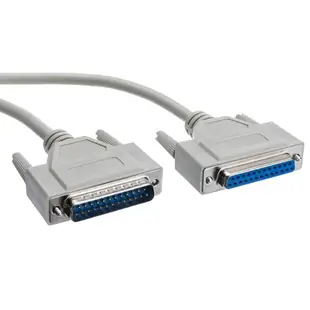
Choose a straight-through DB25 serial lead or extension
The wide DB25 shell turns up on printers, serial devices and specialized equipment. Look for an RS-232 or serial interface in the equipment manual and verify the required wiring before counting connector genders or deciding how far the cable must reach.
What does 1:1 mean here?
On a straight-through lead, each wired pin continues to its corresponding pin at the far end. Check how many conductors the application needs and which ends mate with the equipment. An extension with one female side accepts the plug of a cable you already own.
When a cable fits but nothing responds
Look up both devices’ serial roles and whether they require a crossover. Compare the serial port settings and hardware handshake requirements. If the old lead still works, keep its pinout or part number with the service notes so a later replacement can reproduce the working configuration.
Replacing an extension in a cable chain
A long serial run sometimes starts as a short device cable followed by a straight extension. If the original device cable contains special wiring, its purpose can disappear from view once both leads are tucked behind a cabinet. Photograph their junction and retain the part number from each section. Before replacing both pieces with a single long 1:1 assembly, compare the pin mapping across the entire working chain. If the special wiring is in the short cable, replacing just the extension may be the simplest way to preserve it. Include the length of both pieces when checking the equipment maker’s cable guidance.
Two cables fit the same DB25 sockets but behave differently
The 10D3-01206 and 10D3-08206 are both six-foot DB25 male-to-female leads. The first is a straight serial extension, while the second is described as an eight-conductor null-modem cable. At a workbench those ends can look identical. Read the label or compare the wiring documentation and tag the two cables by function before putting them back in the drawer. If the existing setup needs more reach, continue the signal path according to the device manual. Adding an unintended crossover can stop communication even when both retaining screws fit.
Can two devices keep the same serial settings after a move?
Some older serial devices store their communication settings locally, while their host application keeps a separate profile. If a device worked until it was moved to another station, compare the previous station’s saved settings with those at the new one before ordering another DB25 lead. Record baud rate, data format and flow-control method as the manuals describe them. If controls are set physically on the device, photograph the positions without changing them casually. Then repeat the test with the same known working cable. This keeps a software or configuration change from being mistaken for a difference between two otherwise identical straight-through leads.
Compare parts for your setup
Serial Extension Cable, DB25 Male to DB25 Female, RS-232, 1:1, 100 foot
10D3-012HD
- Connector references
- DB25 Male · DB25 Female
- Length
- 100 ft
Confirm the port carries serial signals and check pin-to-pin wiring and connector genders. Measure the installed route against this 100 ft length.
Serial Cable, DB25 Male, RS-232, 1:1, 3 foot
10D3-01103
- Connector references
- DB25 Male
- Length
- 3 ft
Confirm the port carries serial signals and check pin-to-pin wiring and connector genders. Measure the installed route against this 3 ft length.
Null Modem Cable, DB25 Male to DB25 Female, 8 Conductor, 6 foot
10D3-08206
- Connector references
- DB25 Male · DB25 Female
- Configuration
- 8 Conductor
- Length
- 6 ft
Check both connector genders and the complete pinout, including any hardware handshaking signals. Measure the installed route against this 6 ft length.


