
Identify a serial plotter cable by the exact plotter model
A plotter that accepts a roll of paper but ignores every job might be waiting on a different interface. Find its full model and the port label. Some plotting equipment offers several communication options, each with its own cable and software setup.
What is special about the cable?
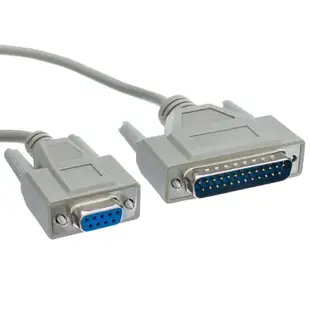
This listing is a six-foot, eight-conductor DB9 female to DB25 male assembly for a plotter application. Compare the required pinout in the plotter manual with the assembly specification. A modem cable with the same size ends can connect different control signals internally.
Check the job path
Note the serial settings on the plotter and the port selected in the sending software. If the plotter can draw its own internal test pattern, the next checks are the host interface, cable requirements and communication parameters. Keep the internal test separate from a job sent by the computer.
Preserve one reproducible plotting test
Make a small test file in the command language the plotter supports, using the equipment software or a file already known to work. Save the file with a note of the sending application and the plotter’s interface settings. After replacing the cable, use that same file before trying a newer drawing program. If the plotter accepts the original job but rejects the new one, verify the program’s output language and driver selection. A sheet that comes out with unexpected marks and a plotter that receives no job at all give you different clues about the link.
Bringing a stored plotter back to its original workstation
Take a photo of the interface label and record the complete plotter model. The 10D1-13306 is listed as a six-foot HP plotter lead with DB9 female, DB25 male and eight conductors. A generic nine-conductor serial extension with similar connector shells may route the lines differently. Check the required plotting interface, handshake settings and host port against the manual for your model. If the plotter can produce its own internal test page, try that before a computer-driven test. It helps distinguish a mechanical printing problem from a failed communication path.
A plotter purchased without its original controller
A secondhand plotter may be for sale with a neatly coiled DB25 lead but no information about the workstation that last drove it. Ask for a photograph of the connector at the plotter, the exact model label and any interface configuration page or manual supplied with the unit. Use those to establish whether your planned computer needs a supported serial adapter, a particular cable pinout and compatible plotting software. Estimate the cost of the whole working path before ordering the cable alone. If the seller can demonstrate a plot from a known host, record that host and connection as a reference configuration.
A closer look at this part
HP Plotter Cable, DB9 Female to DB25 Male, 8 Conductor, 6 foot
10D1-13306
- Connector references
- DB9 Female · DB25 Male
- Configuration
- 8 Conductor
- Length
- 6 ft
Check the exact plotter model, host port and wiring against its manual. Measure the installed route against this 6 ft length.
