
Choose a modular adapter for a serial console
A modular jack on a console adapter looks familiar to anyone who has connected a telephone or Ethernet cable. Identify the serial equipment and its required pin mapping first. The number of positions and populated contacts in the modular plug also matters.
Check both halves of the connection
The assortment includes DB9 and DB25 variants with male or female connectors and different modular jacks. Look up whether the insert is wired for your application or supplied for an installer to configure. Compare any required rollover or straight cable with the diagram supplied for the equipment.
Keep adapters identified
A drawer of identical gray shells can hold several different serial pinouts. Label each working adapter with its equipment model and cable type. That small step helps the next technician avoid sending a known-good serial connection through a look-alike adapter with different wiring.
Avoid confusion with nearby network wiring
A serial console that uses a modular connector can be mistaken for a network connection when several cables terminate at one rack. Trace the path from the console equipment to the host and label both ends with the function before moving it. Check the equipment guide for the exact cable type and adapter position on that path. If a patch panel is involved, record which outlet is dedicated to the console. Then someone working from the front of the rack can restore the connection without guessing by plug shape or connecting a serial lead to an unrelated switch port.
A modular console cable runs through a patch panel
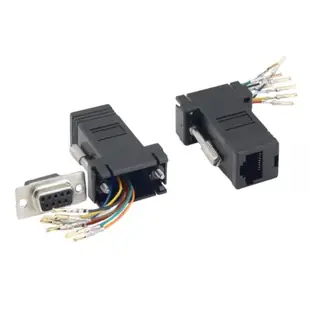
Tag both ends of the path with the interface name, especially if a console connection occupies the same cabinet as Ethernet. The 31D1-1741BK is described as DB9 female to RJ45 jack. To choose or populate an adapter, compare the serial equipment's required signal mapping with the actual modular lead and both endpoints. A straight patch cord and a rolled cord can change where a signal arrives. Use the manufacturer's pin numbering and orientation for each face. A matching eight-position jack alone is insufficient grounds to patch a serial signal into an Ethernet switch.
Using a field kit across several equipment brands
A field technician can use one laptop to service several control devices whose console ports look almost identical. Make a small table with equipment model, console connector, required cable part number and adapter configuration. Keep one known working assembly for each independently verified combination. If an adapter uses configurable contacts, store the final mapping with it and follow the supplier’s instructions for assembly or replacement. Color-coded tape can help a technician find the correct kit, but the model and documented mapping should determine the choice. This system is especially useful when two customers call their incompatible console leads by the same informal name.
Compare parts for your setup
Modular Adapter, Black, DB9 Female to RJ45 Jack
31D1-1741BK
- Connector references
- DB9 Female · RJ45 Jack


