
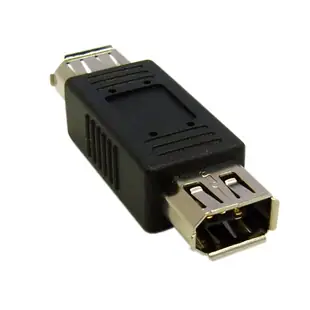
Identify the FireWire cable for an old camera or audio interface
A camcorder can wear an i.LINK or DV label where a computer manual says IEEE 1394. For a capture project, identify the actual data port on the camera, its connector shape and the host interface your capture software supports.
Look for four, six or nine pins
A small four-pin camera connector takes a different plug from a six-pin FireWire 400 computer port or a nine-pin FireWire 800 port. The listed cable ends show which pair they join. Check the equipment’s power arrangement as well. A four-pin connection requires separate device power where the equipment needs it.
Prove the capture route before the full transfer
Check operating-system support for the camera and host adapter. Capture a short clip and play back both picture and sound before committing an afternoon to a box of tapes. A passive cable selected solely because a USB port looks similar cannot translate FireWire into USB.
A camera can play a tape without sending its output
Seeing the picture on the camera’s own screen proves that the tape and local playback path can produce an image. It doesn't establish that the computer sees the camera as a capture device. Check the camera manual for the playback or transfer mode required at its DV port. Note whether the camera appears in the operating system’s device or hardware list before opening the capture application. If it appears there but the application cannot select it, review application and format support. These observations can save an unnecessary search for a rarer cable when the physical link already works.
Does a small FireWire adapter solve both connections?
The 30E3-01300 has a six-pin female FireWire socket and a four-pin male end. It can change the physical finish of a compatible FireWire cable, which is useful when the camera's socket differs from the lead already on the shelf. Sony identifies the four-pin i.LINK connection as unpowered, so prepare the camera's own power source for a long session. Check the FireWire host and capture software separately. A USB socket on the computer remains a different interface even when an old camcorder cable and a USB charging lead have similar-looking small ends.
Which connection carries the original recording format?
Some camcorders expose several output types side by side, such as an analog audio/video connection and a DV or i.LINK connection. If preserving the original recording stream is the goal, identify the camera’s documented digital output and the capture method that supports the recorded tape format. A different output may produce a viewable picture while requiring a different capture device and workflow. Note whether the recording was made in a format the camera itself can play. Assemble the capture route around that information before ordering the cable. A picture on a television says little about what digital stream the computer can receive.
Compare parts for your setup
Firewire Coupler / Gender Changer, IEEE-1394a, 6 Pin Female / 6 Pin Female
30E3-00400
- Configuration
- 6 Pin
Firewire 800 9 Pin cable, Black, IEEE-1394b, 3 foot
10E3-99003BK
- Configuration
- 9 Pin
- Length
- 3 ft
Compare the 4-, 6- or 9-pin port at each end and verify that the computer supports FireWire capture. Measure the installed route against this 3 ft length.


