
Choose the right USB 2 cable for an older peripheral
Look closely at the smaller end of an old camera, external drive or controller cable. A Mini-B connector and a Micro-B connector can both be described as USB 2.0 while having different outlines. The larger host plug can vary too.
Are you extending or replacing?
A Type-A male-to-female extension accepts an existing cable. A cable with a device plug on the far end replaces the existing run. If you need a serial DB9 connection, the USB-to-serial product includes an interface function and requires its own operating-system compatibility check.
Check the job the device must perform
For a programming or photo transfer session, test data with a direct connection. A charging light confirms power is reaching the device; it cannot confirm that the data path works. If the device has more than one USB socket, use the one its manual identifies for that function.
Comparing a short lead and a longer replacement
A USB cable threaded behind a kiosk may have to serve a peripheral that draws its operating power from the host. Before fixing a longer replacement into place, test the peripheral directly with the short lead that you know works. Repeat the same operation with the longer cable on the same host port and with the rest of the setup unchanged. If the longer route also adds a hub, test it separately so the hub’s own power supply and upstream connection do not confuse the result. Keep the useful length and exact connector combination in the kiosk’s service record.
Adding a USB socket to the front of a kiosk
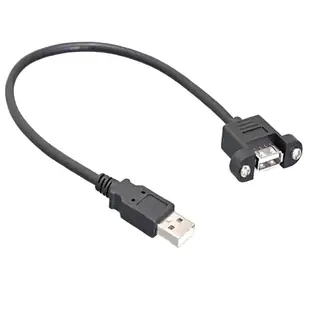
Measure the route from the host socket to the kiosk panel, then inspect how the panel end will be held in place. The 10U2-24106 is a six-foot USB 2.0 panel-mount extension with a male host end and a female panel end. Verify mounting-hole dimensions, clearance behind the panel and cable reach with the service door open. After installation, test the actual barcode reader or payment peripheral in its final position and check its supported cable length. An ordinary loose extension can have the same USB shape but offer no way to secure the public-facing socket.
Find the device port behind a protective flap
An older GPS, recorder or camera may have several tiny sockets under one rubber cover. Open the cover according to the manufacturer’s instructions and use a well-lit straight-on photo of the entire group. Mark which socket is labeled for USB, charging, audio or another accessory. Check the model-specific manual if the printed labels have worn off. A plug that looks plausible from the side can be wrong when viewed head-on, particularly among Mini-B, Micro-B and proprietary device connectors. Keep the cover’s clearance in mind too. A molded plug body must fit the recessed opening deeply enough to make a reliable connection.
Compare parts for your setup
USB 2.0 Panel Mount Extension Cable, Type A Male to Panel Mount Female, Black, 3 Foot
10U2-24103
- Connector references
- Type A Male
- Mounting
- Panel Mount
- Length
- 3 ft
USB 2 - 480Mb - 15 watt - Type A Male to Type C Male - 0.5 meter (1.64ft)
10U2-32100.5
- Connector references
- Type A Male · Type C Male
- Power rating
- 15 watt
- Dimensions in listing
- 0.5 meter · 1.64ft
USB Type A Female Port Dust Cover, Black , 50 Piece/Bag
10U2-10000
- Connector references
- USB Type A Female
- Package quantity
- 50 Piece/Bag
Cover an unused port while storing a device or leaving a patch-panel position vacant.
Check whether the cap fits a plug or a receptacle and match the connector standard.


