
Planning a longer USB 2 extension for a peripheral
A camera or printer sometimes needs to sit farther from the host than a normal desktop cable reaches. Measure the route through the room, including rises and turns, then check whether the peripheral maker supports an active extender in the intended setup.
What does an active extension add?
Look for the supported USB speed, host and device ends, power arrangements and permitted extension length. An active Type-A extension with a female far end still needs the peripheral’s own cable. Include that cable when checking the total supported route. For a building installation, confirm the required jacket rating with the project installer.
Try the intended workload
Set up the entire route before fixing the cable in place. Run a realistic camera session or print job and check whether the peripheral stays visible when the computer wakes. This catches power or compatibility problems that a brief device-detected notification can miss.
Allow for the extender electronics at the far end
An active extension can have a larger housing near one end. Measure the opening through which the complete assembly must pass, including the housing and connector, before putting it on the install list. Decide where the far-end connection will be accessible if the peripheral has to be replaced. If that connection sits above a ceiling or behind permanent furniture, the installer may need a different placement consistent with the project requirements. Write down which end belongs at the host as part of the plan. An installation drawing with only a length and two dots can miss those practical constraints.
Reaching a classroom camera from the teacher station
A camera that works beside the computer gives you a starting point. Document that configuration, then test the intended extension with the same camera mode and software. The UC-50200 is a sixteen-foot active USB 2.0 extension. The 11U2-51025 is a twenty-five-foot active extension listed with a CMP jacket. Confirm the peripheral's bandwidth, power demand and supported extension arrangement, along with any installation requirements for the route. A jacket designation addresses one property of a particular cable. It cannot establish whether the camera will stream reliably at the far end.
Extending a USB printer without losing service access
A label printer on a packing table may sit well away from the computer, but staff still need to replace rolls and clear jams. Mark where the printer moves during those routine tasks and where the active extension’s far-end connector will rest. Keep the join accessible so a damaged short printer lead can be replaced without removing the entire installed run. Before purchasing, check whether the printer uses its own power, the connector it accepts and the extension manufacturer’s guidance for printers or other relevant devices. Send a typical label batch and inspect the final labels after the complete approved route is assembled.
Compare parts for your setup
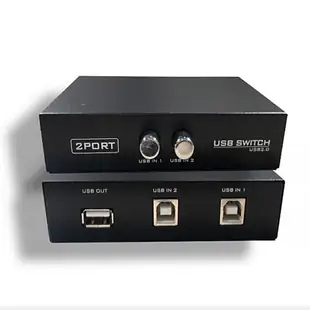
2 PC to 1 USB Device, Manual Switch. USB2.0
40U1-01002
- Package quantity
- 2 PC
Keep an existing data cable when a suitable adapter provides the port shape required by the device. The pack contains 2 pieces; count the parts required per installation.
Plenum USB 2.0 High Speed Active Extension Cable, CMP, Type A Male to A Female, 25 foot
11U2-51025
- Connector references
- Type A Male
- Jacket rating
- CMP
- Length
- 25 ft
Compare full-size B, five-pin Mini-B and Micro-B by shape, and confirm the lead supports data transfer. Measure the installed route against this 25 ft length.
USB A Female to USB Mini-B 5 Pin Male Adapter
30U1-05300
- Connector references
- USB A Female · Mini-B
- Configuration
- 5 Pin


