Find a USB 3 cable for a drive, dock or extension
On many portable hard drives the wide SuperSpeed Micro-B socket has a distinctive two-part outline. It is easy to overlook when searching only for “micro USB.” Photograph the drive’s socket and compare it with the exact ends in the listing.
Which Type-A cable is appropriate?
A male-to-female Type-A extension carries an existing lead farther. A male-to-male Type-A cable has specific equipment applications. Use it only when the equipment documentation calls for it. For a drive, check the required device-end connector and the cable’s stated data rate.
Compare the full transfer path
If an external drive seems slow, connect it directly to a suitable known-fast port and repeat the same file copy. A hub, drive enclosure, file size and storage device can affect the result. Retain the cable part number and test conditions when comparing a replacement.
A backup drive that disconnects when the desk moves
First distinguish a transfer that is slow from one that actually stops because the drive disappears from the operating system. Place the drive on a stable surface and observe the fit of its device plug without pulling or twisting it. Check whether the cable’s molded housing hits the enclosure or laptop case and whether the cable is carrying the drive’s weight. If a short known working cable maintains the connection under the same conditions, compare the replacement’s housing and connector type as well as its speed. A flexible route with adequate support can matter more than the headline data-rate figure.
Finding the right lead for a portable backup drive
A portable disk with the wide, stepped Micro-B USB 3 socket often ends up separated from its original lead. Compare the complete connector outline with the drive manufacturer's drawing. The 10U3-03103 links a USB-A host to USB 3 Micro-B in a three-foot run. If the laptop offers only USB-C, account for that end before ordering. Once the system mounts the disk, copy a folder you can verify and check the negotiated link speed if the operating system reports it. A drive appearing in the file browser confirms detection, but it does not establish the maximum transfer rate.
Check the drive enclosure before ordering several identical leads
Two backup drives with the same capacity can use different enclosures and external connectors, especially if they were purchased in different years. Build the order from the enclosure model printed on each case, the device-side socket and the host ports actually available. If several drives travel together, make a simple inventory linking each drive label to its matching cable. Add a note for any drive that needs a separate power supply. Then test one representative of each enclosure type on the intended computer. This avoids filling a backup kit with fast, correctly labeled cables that happen to fit only one of the drives.
Compare parts for your setup
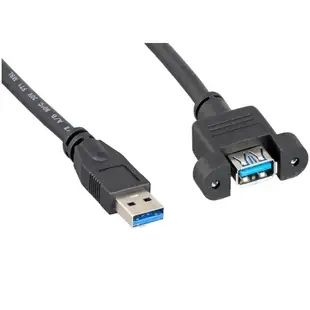
USB 3.0 Panel Mount Extension Cable, Type A Male to Panel Mount Female, Black, 1 Foot
10U3-24101
- Connector references
- Type A Male
- Mounting
- Panel Mount
- Length
- 1 ft
USB 3.0 to RJ45 10/100/1000 Gigabit Ethernet Adapter
30U3-31000
- Connector references
- RJ45
- Data rate
- 1000 Gigabit