
Expand USB ports or send video across a room
The four-port USB hub and the wireless HDMI equipment found in this group solve different connection problems. Start with what must arrive at the other end. A keyboard or storage device needs a USB data connection, while a display needs the video signal it accepts.
Adding ports at the computer
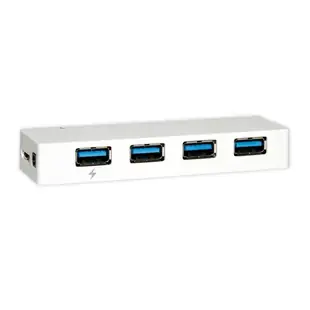
The self-powered hub lists four downstream connections and a 5 Gbps host link. Check its host connector, included power supply and the mix of devices you will attach. Several storage devices share the upstream connection even when each has a separate socket.
Choosing video equipment
For HDMI, check the package contents carefully. A transmitter-only listing is useful when you already own the matching system. A first installation requires a compatible receiver as well. Verify display mode and range conditions for the exact pair before deciding where to position the screen.
Check what arrives in the shipment
Suppose a training room needs one presentation laptop, a display across the room and several USB accessories on the instructor’s desk. List the ports on the laptop and separate the desk USB devices from the video path in that order. A hub can add ports for the keyboard, receiver and other peripherals, while the transmitter and receiver have distinct roles on the HDMI path. Confirm which power supplies, display cables and host cables come with the exact items selected. This purchasing check avoids waiting for a missing short HDMI lead after both wireless units are already installed.
Moving several drives onto one downstream connection
The 41U3-32004 is a self-powered four-port hub listed at 5 Gbps. When planning a transfer station, determine where its power source will sit and how its upstream link reaches the computer. Four downstream ports let several devices attach, while their transfers still share the upstream connection. Test a single drive directly, then through the hub, then during a second transfer. The comparison helps distinguish a slow drive from a shared bottleneck. Check compatibility and power requirements for the storage devices individually, and eject each mounted volume before disconnecting the whole station.
Does a wireless video system also carry your keyboard?
A training room may need to show a laptop on a distant screen and let the presenter control it from the far end. Write those as two separate needs. An HDMI transmitter and receiver are sold for the advertised audio/video path. Check the exact model documentation before assuming they also extend USB keyboard, mouse or touch input back to the computer. If remote control requires another supported device, allow space, power and a route for that device in the room design. On a rehearsal, test both the image at the screen and the presenter’s actual controls from the lectern.
Compare parts for your setup
USB 3.2 Gen 1x1 Super Speed 4 Port Hub, 5 Gbps, White, Self Powered
41U3-32004
- Data rate
- 5 Gbps
- Port count
- 4 Port
Wireless HDMI to HDMI Extender Set, 4K@60Hz, Pair, 50 Meter Range
41V3-40000
- Connector references
- HDMI
- Video format
- 4K@60Hz
- Dimensions in listing
- 50 Meter
Wireless HDMI to HDMI Extender, 4K@60Hz, Tx Unit Only
41V3-40001
- Connector references
- HDMI
- Video format
- 4K@60Hz


