Read the speed and power ratings on a USB-C cable
The USB generation in a department name is a starting point for browsing a mixed assortment. The cable’s own entry tells you its data rating, rated power and connector combination. Check all three for a camera transfer, laptop charge or drive backup.
Examples that look alike from across the desk
This group includes USB-A to USB-C at 480 Mbps and USB-C to USB-C assemblies with higher published link rates. Compare the exact length you want because products sold under similar names can carry different ratings. A charging wattage figure alone does not describe the maximum data speed.
Write down what success looks like
If you want to power a laptop and use a dock’s display and storage, verify the laptop port and dock support those functions and check the dock’s cable requirements. If you just need to copy photos from an older phone, identify its data interface before paying for unused extra capability.
Keeping the right cable with a high-speed accessory
When several USB-C cables are stored together, print a small label with the cable’s documented data rate, power rating and length when you first unpack it. Keep the label or part number with the device for which that capability matters most. If a portable drive later runs slowly on a borrowed cable, test the same drive and files with its identified lead at the same port. If both cables deliver similar results, look next at the enclosure, drive and host. If the results change only with the cable, you have a much clearer basis for ordering a second matching lead.
A USB-C plug can conceal a slower data link
Compare the two numbers in the part listing independently. The 10U2-32100.5 is a half-meter USB-A to USB-C cable listed at 480 Mbps and 15 watts. The six-foot 10U3-32006 also joins A to C and lists 5 Gbps and 10 watts. Those examples show why the cable that lists more power need not list the faster data rate. Start with the transfer you need and the host socket you already have, then check the device's charging requirements. Compare the specifications for the exact length because similar-looking catalog entries can represent different constructions.
Which cable belongs between a portable SSD and a phone?
A phone with a USB-C port and a portable SSD with a matching connector still need compatible data operation, storage format and power arrangements. Check the phone maker’s support for external storage and the enclosure’s requirements before choosing the cable. If the SSD works on a laptop with its original lead, note the connector combination and the drive’s format before trying the phone. Use a small known file to test reading first, preserving important data. A cable with a higher published speed cannot add a missing storage feature to the phone, but choosing one with an appropriate data capability avoids imposing an unnecessary cable limit.
Compare parts for your setup
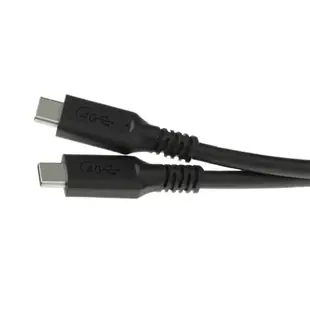
USB4 40Gbps 100 watt Fast Charging Cable, USB Type C Male to Male, ThunderBolt 3 Compatible, PVC Jacket, 1 foot
10U4-34001
- Connector references
- USB Type C Male
- Data rate
- 40Gbps
- Power rating
- 100 watt
- Length
- 1 ft
Match the connector, stated data rate and power rating, and check for explicit video support if a monitor is involved. Measure the installed route against this 1 ft length.
USB-C 3.1 to Gigabit (10/100/1000Mbps) Ethernet Adapter, white
30U3-30010
- Connector references
- USB-C
- Data rate
- 1000Mbps
USB-C High Definition Video Cable, USB-C from device to HDMI 4K on TV, 3 foot
10U2-34003
- Connector references
- USB-C · HDMI
- Video format
- 4K
- Length
- 3 ft
Match the connector, stated data rate and power rating, and check for explicit video support if a monitor is involved. Measure the installed route against this 3 ft length.