
Choose between a USB coupler and an interface converter
A connector change can mean repositioning an existing USB connection or making a different type of device communicate with USB. Describe both pieces of equipment and the port at each before buying something labeled simply “USB adapter.”
Coupler, insert or serial adapter?
A female-to-female coupler joins compatible plugs in a supported USB setup. A panel insert puts a connection at a wall plate or equipment panel. The USB-to-DB9 serial cable creates a serial interface and may require a compatible driver. Compare the job each item performs before comparing price or length.
What must the far end receive?
For a serial terminal, record baud rate, wiring type and handshake requirements. For a USB peripheral, check the host connection and the total cable path after adding the adapter. A small coupler can change the ends available without adding power, software support or a new protocol.
Decide which side of a panel the plug must occupy
A USB connection routed through a lectern or test panel can use a coupler or a purpose-built keystone insert, depending on the opening and the cables already terminated. Sketch the front view the user will see and the back view the installer will reach. Record plug type and gender on each separate cable. Check whether there is room behind the panel for a molded plug without bending it against the enclosure. If the front must accept a guest’s cable, identify which end guests actually bring. These practical details determine whether the panel connection remains usable after the first installation.
One adapter changes shape and another adds an interface
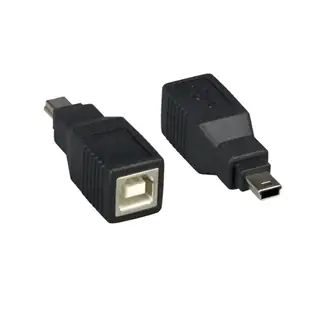
The 30U1-08310 accepts a USB-B plug and presents a five-pin Mini-B male end. The 10U1-06103 instead links USB-A to a DB9 serial interface. If the intended device needs a COM port, look for driver and operating-system support and check the serial signal requirements at the DB9 end. If it simply needs the USB cable already installed in a cabinet to mate with a different USB socket, start with the physical adapter. These jobs may both be described as “USB adapter” on a parts request but require entirely different checks at the receiving device.
Converting for an older printer at a new workstation
A printer with a square USB-B port can often use an ordinary USB data cable once the host-side connector is identified. A printer with a parallel or serial port needs a different type of interface and driver support. Look for the actual port label on the printer rather than assuming the cable from another printer fits the same job. If an existing USB cable ends in Type-A and the new laptop has only USB-C, compare a compatible host adapter with a single correctly terminated data cable. Check how much space the chosen arrangement takes beside other laptop ports before building a permanent workstation around it.
Compare parts for your setup
USB B Female to USB Mini-B 5 Pin Male Adapter
30U1-08310
- Connector references
- USB B Female · Mini-B
- Configuration
- 5 Pin
USB Coupler / Gender Changer, Type A Female to Type A Female
30U1-02400
- Connector references
- Type A Female
USB A to B Adapter, Type A Female to Type B Female
30U1-03400
- Connector references
- USB A · Type A Female · Type B Female


