
Will a powered four-port USB hub suit your desk?
A laptop with one accessible port can have plenty of computing power and no convenient way to keep the keyboard, receiver, webcam and external drive connected. List those devices and their power needs before choosing where the hub should sit.
What does the host link carry?
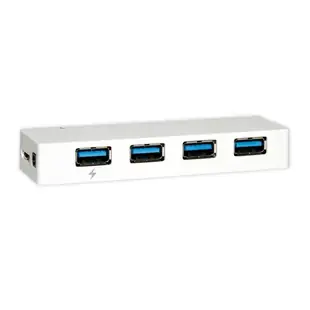
The four-port model lists a 5 Gbps host link and separate power. Its connected devices share that data path. Check which host connector you need, which downstream plugs fit, and whether wide devices or adapters will block a neighboring socket. Keep an outlet available for the hub’s power supply.
Test your busiest combination
Run a typical webcam session during a drive copy if that is how you work. Compare with the drive connected directly and keep the same files for both tests. If your goal is also charging the laptop or attaching a display, compare the specific features of a dock for those functions.
What happens when you undock the laptop?
A shared desk may keep a monitor, external disk and several small receivers connected all day, while the laptop leaves between meetings. Identify which peripheral belongs to whom and which storage devices must be ejected before unplugging the host cable. Check where the hub’s own power adapter will stay so it does not leave with a traveler. Label the upstream connection that goes to the laptop. If two colleagues each need independent access to the same peripherals, confirm how the equipment is meant to switch hosts. Four downstream ports describe the number of devices attached to the hub, not the number of independent computers.
Freeing desk space without losing a keyboard or webcam
Make a port map for a typical meeting. Put the keyboard, mouse, webcam and any USB microphone on the list, including devices that must remain connected together. The 41U3-32004 provides four USB ports and is described as self-powered. Confirm the plug for the upstream computer and the power arrangement for the hub. Run a short meeting with the intended camera resolution and microphone selected, then test resuming from the laptop's sleep state. That rehearsal can expose a connection or power issue that won't show up when only a mouse is attached.
Mounting the hub in an accessible place for a shared desk
A hub that sits under a monitor can make ports easier to reach, but the layout changes when someone needs to insert a large security key or a thumb drive with a wide housing. Lay the real devices beside one another and compare their spacing with the hub’s port layout. Keep any device that users remove regularly near the edge they can reach. Route the upstream cable and power cord so removing one peripheral does not drag the whole hub forward. If the site needs keyed, locking or managed ports for a specific workflow, document those features separately before choosing a general-purpose desktop hub.
A closer look at this part
USB 3.2 Gen 1x1 Super Speed 4 Port Hub, 5 Gbps, White, Self Powered
41U3-32004
- Data rate
- 5 Gbps
- Port count
- 4 Port
