
Connect a DisplayPort computer to a VGA monitor
This shelf collects several DisplayPort products. Some send digital video to HDMI or DVI, and some accessories simply protect an unused socket. If the display has the familiar three-row VGA input, look specifically for DisplayPort input and VGA output on the adapter description.
Does the adapter perform digital-to-analog conversion?
DisplayPort video and VGA use different signals, so an adapter for this route needs the appropriate conversion. A passive DisplayPort-to-DVI adapter has a different destination. Confirm the computer’s exact port size and identify whether the VGA cable from the monitor ends in a male plug before choosing the adapter’s output connector.
What should I test on a legacy display?
Select a resolution and refresh supported by the display and adapter together. Use the monitor’s auto-adjust function if the analog image is slightly off-center. For presentations with sound, plan a separate audio path because VGA carries the picture. Store the adapter with that setup’s VGA cable to simplify future connections.
Would a different adapter simplify this setup?
If the monitor also has DVI-D or HDMI, compare a digital path supported by the same source before committing to VGA. Write down the available inputs on that particular monitor and the cable already at the desk. A second digital input may also leave VGA available for an older computer.
Give a VGA-only projector a source with DisplayPort
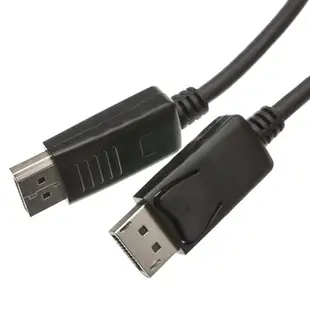
A borrowed laptop and an old classroom projector make it easy to order a cable with the correct computer plug and the wrong display plug. First identify full-size or Mini DisplayPort on the laptop, then confirm the projector's selected input. The catalog's 10H1-60106 is DisplayPort at both ends. It can connect a compatible digital screen, but the VGA classroom job calls for a suitable DisplayPort-output-to-VGA conversion path. If the projector has a permanently attached cable at the lectern, note whether the converter needs a female VGA socket. Test the school's normal projector resolution and identify a separate audio connection for sound. Keep the projector input number on the classroom's adapter label.
Can the presenter hear media when the VGA picture works?
A DisplayPort computer can supply video to a VGA projector through a suitable converter, but VGA itself does not carry the presentation's audio. Before choosing an adapter, check how the room handles sound. An existing analog audio input may sit beside VGA on the wall, or an independent speaker may take sound directly from the laptop. Newer laptops may lack a round audio jack. Identify the required audio output and how the meeting app selects it. Play one video clip that has both music and spoken dialogue during rehearsal. Seeing the slides on the projector answers the picture question while that clip checks the entire room setup. Check a spoken clip from the laptop in advance so you can hear sound from the audience seats.
Compare parts for your setup
DisplayPort v1.2 Video Cable, 17.28 Gbit/s Data Rate for up to 4k@75Hz, DisplayPort Male, 6 foot
10H1-60106
- Connector references
- DisplayPort · DisplayPort Male
- Data rate
- 17.28 Gbit/s
- Video format
- 4k@75Hz
- Length
- 6 ft
Match the source end, display end, resolution and refresh rate, especially for links between DisplayPort and HDMI. Measure the installed route against this 6 ft length.
DisplayPort 1.4 Coupler / Gender Changer, DisplayPort Female to DisplayPort Female, Black
30H1-60400
- Connector references
- DisplayPort · DisplayPort Female
USB 3.1 Type C to Mini DisplayPort Video Adapter, requires Thunderbolt3 or DisplayPort Alt Mode
30U3-34560
- Connector references
- Type C · Mini DisplayPort · DisplayPort


