
Connect a modern laptop or an older PC to a VGA monitor or projector
A conference-room projector has a perfectly good image, but the blue cable on the lectern doesn't fit the presenter's new laptop. In another office, the old computer still has VGA and the replacement monitor accepts HDMI. Those two setups require opposite signal paths. Name the source first and the screen second. Then look for the connector, conversion direction, resolution and audio arrangement that will preserve the presentation you want the audience to see and hear.
Can I use a regular VGA cable between these two devices?
Look for the familiar 15-contact, three-row connector, often called VGA, HD15 or DE-15. Read the labels to distinguish a video input from an output or monitor loop-through. For a computer with VGA output and a display with VGA input, a matching VGA cable is the usual starting point. Atlas lists 10H1-11110 as a ten-foot slim male-ended SVGA cable with ferrites. Count the route around furniture rather than measuring straight from screen to laptop. Allow room for the connector shell and its thumbscrews. A tight bend at the back of the lectern can strain an otherwise suitable lead.
What adapter works for HDMI, USB-C or DisplayPort to VGA?
Converting a digital video output into analog VGA requires a compatible converter. Atlas part 40H1-31410 takes HDMI from the source and provides a VGA socket for a monitor cable. Its listing specifies USB power, stereo audio support and a maximum 1920 by 1080 picture. Check the display's supported modes, too. An older projector may need a lower resolution or a particular aspect ratio. If your source is USB-C, verify that the computer can output video through that specific port and that the chosen adapter supports it. For a VGA computer feeding an HDMI display, search explicitly for a converter built for that reverse direction.
Where does sound go during a presentation?
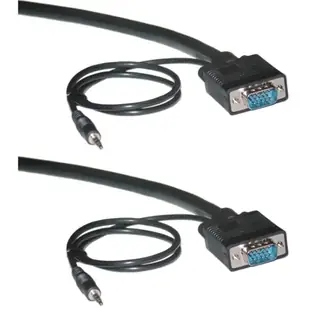
Standard VGA carries the picture. If the projector has speakers, identify the audio input associated with its VGA source. A separate 3.5 millimeter lead may connect a compatible laptop audio output to that input. Some combined cables include a separate audio plug alongside each VGA connector. A silent projector with a good picture can simply be listening to the wrong audio input. Rehearse with a clip that contains speech, check the computer's selected audio output, and confirm the room's volume and mute controls before the audience arrives.
Can I feed a second screen or a bank of BNC jacks?
For two displays, decide whether both should show the same slide or show different content. A VGA Y lead splits one source signal for duplication. The catalog's 10H1-27708 is specifically described as low resolution. Compare a powered distribution amplifier's supported distance and display modes if you need dependable duplication over a longer path. For legacy monitors with BNC inputs, check the count of jacks and the sync labels printed beside them. A five-connector VGA breakout such as 10H1-18106BK only makes sense when the monitor accepts that documented signal arrangement. Test the actual source, cable and screen together before permanently routing the cable.
Compare parts for your setup
Shielded SVGA Cable with 3.5mm Audio, Black, HD15 Male, Coaxial Construction, Double Shielded, 6 foot
10H1-29106
- Connector references
- HD15 Male
- Dimensions in listing
- 3.5mm
- Length
- 6 ft
Identify whether the source produces VGA or requires conversion, then check connector gender and supported resolution. Measure the installed route against this 6 ft length.
USB 3.1 Type C to Mini DisplayPort Video Adapter, requires Thunderbolt3 or DisplayPort Alt Mode
30U3-34560
- Connector references
- Type C · Mini DisplayPort · DisplayPort
DisplayPort 1.4 Coupler / Gender Changer, DisplayPort Female to DisplayPort Female, Black
30H1-60400
- Connector references
- DisplayPort · DisplayPort Female


