
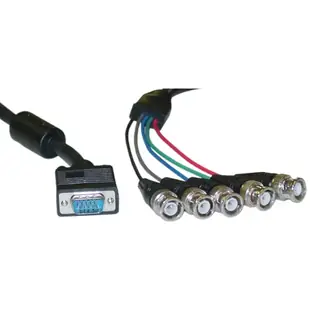
Connect a VGA output to a monitor with separate RGB sockets
Some older projectors and professional monitors expose separate BNC sockets for color and sync rather than one VGA input. Check the monitor’s input panel for R, G, B, H and V or a combined sync marking. Photograph all the labels together before selecting a breakout lead.
Does my monitor want four or five leads?
A five-way VGA breakout can carry separate horizontal and vertical sync to an RGBHV display. A four-way connection uses another sync arrangement and needs matching capabilities from the source. Read the screen manual for the acceptable input timings and sync type. Choose connector genders to mate with the adapter or existing run you have.
How can I spot a wiring mix-up?
Try a simple test picture with distinct red, green and blue areas. If the picture holds steady but colors appear swapped, compare the markings on the three color leads. If the image will not lock, revisit sync routing and the computer’s output mode before replacing all the cables.
Is this the same as an RGB component-video cable?
RGB computer video and YPbPr component video describe different signal formats. The colors of the wires can look deceptively similar. Confirm the marking on the projector input and the available mode on the computer. A collection of passive adapters does not perform the necessary format conversion.
Read the sync legend on an older graphics monitor
A graphics monitor with separate BNC jacks may label them R, G, B, H and V, or use another arrangement. Copy the exact labels and consult the monitor's accepted timing and sync modes before choosing a breakout from the graphics card. A six-foot 10H1-18106BK has an HD15 male plug and five BNC male ends. A device with only four jacks needs the documented four-jack configuration; simply leaving one cable from a five-way breakout hanging is not proof of compatibility. Verify the display mode at the computer first and record which colored lead goes to each labeled terminal after the first successful test. Save a front-facing picture showing which BNC jacks remain intentionally open.
Choosing a breakout or individual coaxial runs for a service rack
A one-piece HD15-to-five-BNC cable offers a convenient labeled fan-out when the workstation sits close to the monitor. If the rack already uses individual BNC leads, document the label and destination of each one before replacing the assembly. Measure the distance between the first and last input as well as the overall cable route. A breakout can be long enough from computer to rack while the individual tails cannot physically span widely spaced inputs. Ask for the fan-out length when it matters. If the installation also passes through a panel, record which side has plugs and which side provides sockets to avoid adding unnecessary joins. Mark any removable front lead with its patch-panel position to simplify the next equipment swap.
Compare parts for your setup
SVGA (HD15 Male) to BNC (5 Male) Monitor Breakout Cable, Black, Double Shielded, 6 foot
10H1-18106BK
- Connector references
- HD15 Male · BNC
- Length
- 6 ft
Count the BNC plugs and compare the equipment’s sync labels before choosing a four- or five-connector assembly. Measure the installed route against this 6 ft length.
BNC x 4 Male to BNC x 4 Male Cable, Double-Shielded, 25 foot
10B1-06125
- Connector references
- BNC
- Length
- 25 ft
Count the BNC plugs and compare the equipment’s sync labels before choosing a four- or five-connector assembly. Measure the installed route against this 25 ft length.
SVGA (HD15 Male) to BNC (5 Female) Monitor Breakout Cable, 1 foot
10H1-17201
- Connector references
- HD15 Male · BNC
- Length
- 1 ft
Count the BNC plugs and compare the equipment’s sync labels before choosing a four- or five-connector assembly. Measure the installed route against this 1 ft length.


