
Can a VGA Y cable show one picture on two monitors?
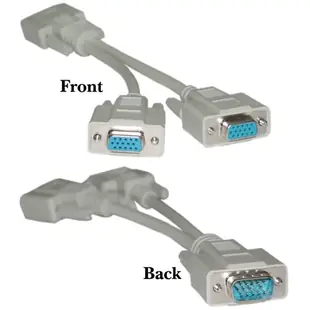
The product here is a short passive, low-resolution HD15 Y cable with one male plug and two female sockets. Its job is to branch one analog video signal to two displays. It is useful to identify that limitation before promising a customer two independent workspaces.
Will both screens show the same desktop?
Yes, the two outputs carry the same source image. To extend the desktop across two different screens, look for independent video outputs supported by the computer. For mirroring, check a common resolution and refresh rate that both monitors accept. Cable lengths and display loading can affect image quality with passive splitting.
How should I try it in a training room?
Start with one monitor and a short known-good VGA lead, then connect the second screen and compare text sharpness. For long room runs or a sharper image than this low-resolution cable can supply, investigate a powered VGA distribution amplifier specified for the required resolution and distance.
What happens when one monitor is disconnected?
Check the remaining screen at the resolution you normally use. Passive setups can behave differently as monitors and cable lengths change. If a training room must work reliably with either audience screen absent, document that requirement and test that exact scenario before committing to a passive branch.
Check whether two information screens really need the same picture
Suppose a reception desk needs one arrival message on the counter and the same message in the waiting area. A VGA Y assembly duplicates one analog source to compatible displays. The compact 10H1-27708 is explicitly listed for low resolution. Match its intended use to the lettering size and viewing distance required on both screens. Test each display with a direct cable, then test both through the proposed splitter at the common supported mode. If either run is long or text loses definition, compare a powered distribution amplifier rated for that mode and length. For two different arrival lists, look for independent computer outputs. Read the smallest message from the farthest waiting-room seat when testing.
Should a presenter see private notes on the second screen?
Decide exactly what the audience should see before sharing a VGA output. A passive Y cable duplicates the analog feed, so any presenter notes or private messages visible in that feed can appear on both displays. If the speaker needs notes, a timer or the next slide on a separate screen, check that the computer can supply a second independent display output and that the presentation software supports that arrangement. If both screens should display the same public score or timetable, document a resolution each screen accepts. Rehearse the complete workflow including any windows the operator must open between presentations before installing the splitter permanently. During rehearsal, ask someone at the audience screen which information remains visible when slides are paused.
A closer look at this part
VGA Y Cable, Low Resolution, HD15 Male to 2 x HD15 Female, 8 inch
10H1-27708
- Connector references
- VGA · HD15 Male · HD15 Female
- Length
- 8 in
Identify whether the source produces VGA or requires conversion, then check connector gender and supported resolution. Measure the installed route against this 8 in length.
