
Choosing Bluetooth headphones, earbuds or a speaker for an Apple device
Think about who needs to hear the sound. A small speaker makes sense for a cooking video that two people are following across a kitchen. Earbuds work better when one person is listening to directions on a walk. For an appointment or a client call, the person on the far end needs to hear you too. Those three situations point to different Bluetooth accessories, even though each can appear in the same pairing menu.
Can I take a call with these headphones?
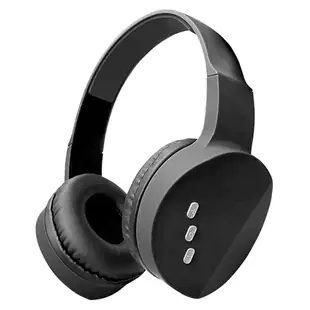
Look for a microphone in the exact model description. The adjustable-headband 5002-33200 explicitly lists a built-in mic. The 5002-40320 is a portable Bluetooth speaker with a light. Its listing gives you a reason to consider it for playback, but no basis for counting on a speakerphone for meetings. If call handling matters, also check how you mute yourself. A mute button in your meeting app is worth locating before you answer your first call in a busy room.
Which earbud design fits my routine?
The 5002-406 series lists an over-ear clip and a charging case. The 5002-407 series also comes with a charging case and uses a different design. If you wear glasses, imagine putting the earpiece on and removing it while keeping your frames in place. If you often take one earbud out at a counter, think about where the open case will sit. Look up the model's care instructions before assuming a particular earbud can handle a workout or rain. Black and white versions also carry different part numbers.
Why isn't my iPhone finding the speaker?
First charge the speaker or earbuds and put them into pairing mode using the accessory's instructions. A power light by itself may only mean the unit is on. Open Settings and Bluetooth on the iPhone or iPad, keep the accessory close and select its name when it appears. If an old phone in the same room picks it up first, disconnect it there and try again. When a saved accessory repeatedly fails, Apple also documents forgetting that device and pairing it again.
It says connected. Where is the sound going?
Start a familiar recording at a modest volume and check the playback destination on the Apple device. If music plays through the accessory, open the calling app and check its microphone and speaker selections separately. Record a short voice sample or ask someone to call back before using the headset for an interview. When a Mac starts using a Bluetooth headset's microphone, playback quality can change. If music suddenly sounds muffled after a call, quit the app using the mic and reselect the headphones.
Will it switch between my iPad and Mac?
Write down how you expect the handoff to work. Manually disconnecting from a tablet and selecting the headset on a Mac is one workflow. Taking a call on one device while the other stays connected requires an accessory that documents that feature. Check the manufacturer’s instructions for the particular model. When comparing two headsets, the answer to that question may be more important on a workday than either color or case shape.
Compare parts for your setup
Bluetooth Wireless Headphone w/ Built-in Microphone, Adjustable Headband, Black
5002-33200
- Configuration
- Built-in Microphone


