
Headphones for a Mac, iPhone or iPad when the microphone matters
A perfectly good pair of headphones can get you through a flight and still let you down at the first question on a video call. Before choosing earbuds, a headset or a replacement lead, decide what needs to travel each way. You may only need to hear a lesson. You may want to record a spoken answer on an iPad, hear an editing timeline in a quiet room or let a customer hear you from a busy counter.
Which plug should I look for?
Inspect the device you will actually use. The catalog includes 5002-110BK USB-C earbuds with a microphone, and 5002-112WH Lightning earbuds with a microphone. Each plugs into its own type of socket. If your favorite headset already has a round 3.5 mm plug, check whether the Mac has a suitable jack or whether your phone needs an audio adapter. A simple headphone adapter may support listening while omitting the microphone or remote controls. Look for explicit headset support and confirm any particular button you rely on.
Do I need a headset extension or a replacement cord?
Unplug the existing lead and inspect both ends. A fixed headset cord already ends in a plug, so additional reach requires a female socket on the extension. The six-foot 10A1-40206 has a male plug and female socket and is listed for stereo plus microphone. The 10A1-40106 is a six-foot male-to-male TRRS lead. That second configuration is useful when two sockets must be joined. Count the metal contacts on the plug and check the headset wiring arrangement as well. A three-contact stereo section in the middle can leave you hearing the other person while your microphone is silent.
What is different about headphones for a shared space?
At a library desk or on a train, consider the sound reaching your ears and the sound picked up by your mic separately. A folding headset such as 5002-409BK lists active noise cancellation. That feature alone doesn't specify what your caller hears. In a shared office, make a trial recording with the keyboard in use and the headset in the position you actually wear it. Play it back before deciding whether you need a different microphone, a quieter corner or a better-fitting earpiece.
How can I check both sides of a call?
On the Mac, inspect Sound settings for both the output and input. Choose the intended device, play a familiar clip, then make a brief voice recording while moving the headset microphone normally. Check the calling app's own selections as well, especially if you previously used the laptop's speakers or a USB microphone. A successful music test answers only half the question. On a phone, repeat the check with the case fitted so you know the plug seats fully.
What should go in a classroom or travel bag?
For a class using the same tablets, a model such as 5002-11306 packages six USB-C earbuds with microphones. Try one on the exact classroom device and app before outfitting the whole group. For a personal travel set, check whether you need to hear announcements, whether the cord reaches the pocket where the phone sits and whether the chosen earpiece stays comfortable with glasses. Those details can make a simple pair easier to use every day.
Compare parts for your setup
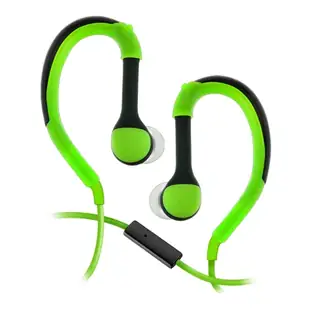
Flexible In-Ear Buds w/ In-Line Mic, Sports Ear Clip, 3.5mm, Green
5002-125GN
- Dimensions in listing
- 3.5mm
Bluetooth Wireless Headphone w/ Built-in Microphone, Adjustable Headband, Black
5002-33200
- Configuration
- Built-in Microphone
Pro Series USB-C Earbuds With Mic, 6 pack (2 Black, 2 Purple, 2 Blue)
5002-11306
- Connector references
- USB-C
- Package quantity
- 6 pack
Choose a headset for calls or an adapter to reuse a favorite wired pair with another device. The pack contains 6 pieces; count the parts required per installation.


