Which MacBook adapter belongs on your desk or in your travel bag?
Draw your desk from the MacBook outward. You might have a single HDMI monitor, a wired network jack, two USB-A peripherals and a charger. Now draw the smaller setup you use on the road. If travel usually means connecting to one presentation screen, a single video lead can do that job. The more complicated desk may justify a dock. Counting the ports you use at the same time makes the difference visible.
How do I keep the monitor I already have?
Read the monitor's input label and decide whether its video cable will stay in place. A USB-C to HDMI cable such as 10U2-34006 can run six feet from a suitable MacBook video output to a free HDMI input. A dock with an HDMI socket can accept an existing HDMI cable. If the monitor takes DisplayPort, look at the USB-C to DisplayPort options instead. Check your Mac model's supported display count and resolution before planning a second screen. Two sockets on a dock do not by themselves establish that the Mac can extend its desktop to both.
Which features on a MacBook dock will I actually use?
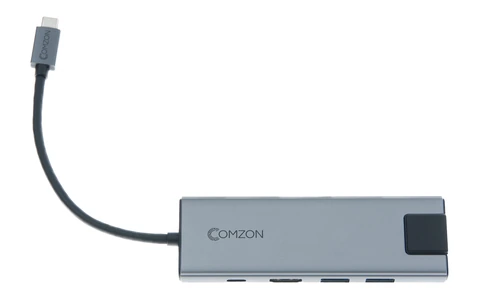
Consider a photographer returning from a shoot. The 30U3-35000 mini dock offers an SD slot, a microSD/TF slot, USB-A ports, HDMI, Ethernet and a 3.5 mm audio connection. That mix could replace several devices on the desk. Look closely at the card reader specification and your card format if transfers eat into billable time. A simpler 30U3-33001 lists HDMI at 4K and 30 Hz. A presentation made of still slides has different motion requirements from editing a screen recording or scrolling a detailed timeline all afternoon.
Does a 100-watt USB-C cable charge every MacBook at 100 watts?
The rating is a ceiling for the cable. The Mac, charger and any dock in the path also determine the power available. Identify the adapter recommended for your MacBook model and read the wattage on the charger you plan to carry. Where a dock offers power pass-through, check how much power it accepts and how much reaches the computer. For a real-world check, Apple's Mac power guide shows where System Information reports the wattage of the connected charger.
Will this cable copy a large folder quickly?
Read the data rate separately from the charging rating. In this catalog the six-foot 10U4-32006 lists a 20 Gbps ceiling and 100 watts. The shorter 10U4-34003 lists 40 Gbps and 100 watts. The matching power figures hide a useful data difference. Check the speed supported by your Mac's chosen port and the external drive or enclosure before paying for a higher-rated cable. Measure the run to the drive in its normal position too.
What belongs in a travel pouch?
Work from the rooms you actually visit. If meeting rooms offer HDMI and hotel desks offer wired Ethernet, identify which MacBook port each accessory needs and whether you still have somewhere to plug in power. A dedicated USB-C to Gigabit Ethernet adapter such as 30U3-30010 takes less desk space than setting up a full dock just for network access. Test the chosen combination at home, then label the items by job so a colleague borrowing the kit can connect it without guessing.
Compare parts for your setup
USB-C 9-in-1 Mini Dock. HDMI, USB C PD 100W, USB A 3.0 x 3, SD/TF 2.0, LAN 1000Mbps, 3.5mm Audio, Gray
30U3-35000
- Connector references
- USB-C · HDMI · USB C · USB A
- Data rate
- 1000Mbps
- Power rating
- 100W
- Dimensions in listing
- 3.5mm
Run an HDMI monitor, a USB keyboard and a wired network connection through one compatible Chromebook port while a separate charger feeds the dock.
HDMI is rated up to 4K at 30 Hz. The charging-only USB-C input accepts up to 100 W; check the computer’s requirements and the power delivered to it.
USB-C High Definition Video Cable, USB-C from device to HDMI 4K on TV, 3 foot
10U2-34003
- Connector references
- USB-C · HDMI
- Video format
- 4K
- Length
- 3 ft
Match the connector, stated data rate and power rating, and check for explicit video support if a monitor is involved. Measure the installed route against this 3 ft length.
USB 3.0 to RJ45 10/100/1000 Gigabit Ethernet Adapter
30U3-31000
- Connector references
- RJ45
- Data rate
- 1000 Gigabit