Which USB-C cable or dock will do the job?
The oval USB-C shape can appear on a charger, an external drive, a monitor and the side of a laptop. Write one sentence describing what you want to pass between the devices. Charging, transferring data and driving a screen place different requirements on a connection.
Buying for a drive or a display
For storage, check the host port’s speed, cable rating and enclosure interface. For a display, look up the laptop’s video output support, the dock or adapter’s input requirements and the resolution and refresh rate offered at its output. Similar plug shapes can hide very different capabilities.
Buying for charging as well
Check the wattage specified for the cable and the power source. With a dock, look up how much can actually reach the laptop while the dock is operating. Select the needed length last and read that variant’s specification before ordering for several desks.
Make a short compatibility list for a one-cable desk
For a one-cable desk, write down the laptop model, the dock model, the display mode, the power supply wattage and the device that needs the highest data speed. Look for the dock maker’s recommended host cable for that complete combination. If the original dock cable works, keep it available for a comparison with the longer one you would prefer for the desk. Test charging, screen and storage together after connecting. A cable that charges the laptop during a brief check might still omit a capability that matters when the screen and external drive are also in use.
Is that USB-C to RJ45 lead for network access or console access?
The 10U3-38110 is described as a flat USB-C to RJ45 console cable for management connections. The plug at the network equipment end resembles an Ethernet plug. Determine whether you are trying to reach a serial console or join a network through an Ethernet port, and consult the equipment diagram before connecting. For ordinary wired network access, look specifically for a USB Ethernet adapter with a supported operating system and network speed. If you are replacing a console lead, record the managed device model and its console pinout so the next person can identify the right cable.
Can the monitor itself act as the laptop connection?
Some monitors provide a USB-C upstream input with specific combinations of video, USB data and laptop charging. Others use USB-C only for a narrower purpose. Consult the manual for that exact input, including its supported power output and the cable the display maker recommends. Compare the monitor’s available charging power with the laptop’s normal requirement, especially for longer work sessions. If the monitor also offers downstream USB ports, verify how they connect back to the laptop before buying a separate hub. A useful first test connects the laptop, monitor and one peripheral directly with the documented host cable and checks picture, charging and device detection separately.
Compare parts for your setup
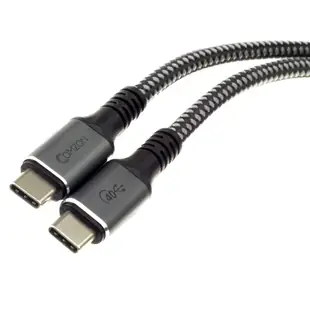
Comzon 40Gbps 100 watt USB4 Cable, 8K/4K 1080p, ThunderBolt 3 & 4 Compatible, Fast Charging, USB Type C Male, Braided Jacket, 3 foot
C2034
- Connector references
- USB Type C Male
- Data rate
- 40Gbps
- Video format
- 8K · 4K · 1080p
- Power rating
- 100 watt
Consult both the host and accessory specifications for video output, charging direction and data rate. Measure the installed route against this 3 ft length.
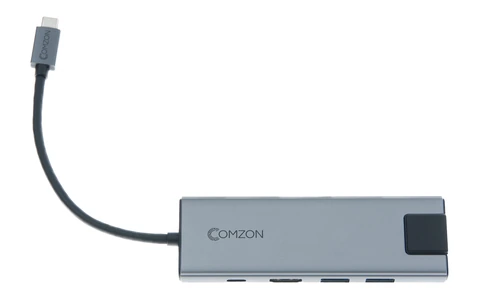
USB-C 9-in-1 Mini Dock. HDMI, USB C PD 100W, USB A 3.0 x 3, SD/TF 2.0, LAN 1000Mbps, 3.5mm Audio, Gray
30U3-35000
- Connector references
- USB-C · HDMI · USB C · USB A
- Data rate
- 1000Mbps
- Power rating
- 100W
- Dimensions in listing
- 3.5mm
Run an HDMI monitor, a USB keyboard and a wired network connection through one compatible Chromebook port while a separate charger feeds the dock.
HDMI is rated up to 4K at 30 Hz. The charging-only USB-C input accepts up to 100 W; check the computer’s requirements and the power delivered to it.
USB C to 3.5mm Adapter Cable for connecting headsets, 5 inch, White
30U2-35000
- Connector references
- USB C
- Dimensions in listing
- 3.5mm · 5 inch