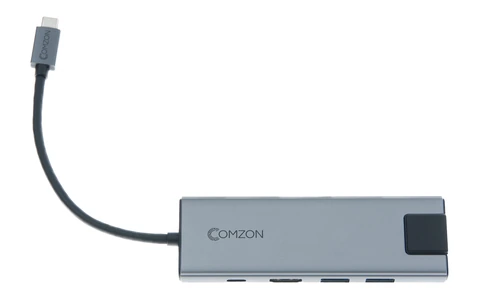
How to connect an iPad to a classroom display, camera card or desk setup
At home, your iPad may need only a charging cable. In a classroom it may need to show a Keynote slide, hide your notes from the audience and stay charged through the next session. At a photo shoot it may need to read a camera card so the client can review the images. Think through one complete session before picking a cable or dock. Include what will be connected simultaneously, where power comes from, and which task the iPad app must perform.
Which USB-C to HDMI adapter works for an iPad presentation?
Identify the iPad under Settings, General and About. Check that exact model against Apple's USB-C iPad guide. The tablet affects the output you can get from an adapter. Apple lists up to 4K at 30 Hz for an iPad Air (4th generation) using Apple's USB-C Digital AV Multiport Adapter. For the iPad Air (5th generation) it lists supported video content up to 4K at 60 Hz with that adapter. Those figures apply to Apple's stated setup. For a third-party part such as the 30U3-33001 dock, check its own HDMI limit of 4K at 30 Hz and confirm support for your particular iPad.
Can my audience see the slides while I see my notes?
Keynote on iPad supports a presenter display when connected to a separate screen. Set up the presentation with a test slide containing a presenter note, connect the external display and start playback to the external screen from Keynote. Look at both screens before the audience enters. If the room has an HDMI lead attached to the lectern, choose an adapter with a socket for that plug. If only an empty HDMI input is available, a complete USB-C to HDMI lead such as 10U2-34006 may suit a compatible iPad.
How do I review photos from a camera without carrying a laptop?
Look at the memory card before choosing a reader. SD and microSD need different openings, and a hub can specify a different transfer rate for its reader than for its other ports. The 30U3-35000 dock lists both SD and microSD/TF slots. Confirm compatibility with your card, iPad and app. Import a short shoot, then open a full-resolution photo and a video on the iPad. Leave the camera originals intact until you have checked your copies and completed your usual backup.
Can I use a wired connection at the desk?
For a room with an Ethernet jack, the 30U3-30010 USB-C to Gigabit Ethernet adapter is a candidate when its chipset and operating-system requirements match the iPad. Check where the Ethernet route ends and whether the site requires network registration. A standalone adapter takes up the tablet's port. If you also need power, storage or a display, compare a dock that provides these connections together. Test the wired connection at the actual site before a lesson or client appointment.
Will everything fit around the iPad stand?
Put the iPad in the case and stand you will use. Check whether the hub's plug clears the case and whether cable weight pulls sideways when the screen tilts. Set the dock on the desk with space to insert a memory card, and plan the charging lead around that position. If your configuration is simpler, USB-C earbuds with a microphone such as 5002-110BK may cover a remote tutoring session on a compatible iPad. Test the lesson's microphone and playback without taking the tablet out of its stand.
Compare parts for your setup
USB-C 3.1, 3-in-1 Mini Dock, 4k HDMI @ 30Hz, USB 3.0 Type-A, & 100W USB-C Charge Port
30U3-33001
- Connector references
- USB-C · HDMI · Type-A
- Video format
- 4k
- Power rating
- 100W
Connect one HDMI display and a USB mouse while keeping a compatible USB-C laptop attached to its charger through the dock.
The HDMI output is rated up to 4K at 30 Hz; verify host video support and the charger and cable ratings required by the laptop.
USB-C High Definition Video Cable, USB-C from device to HDMI 4K on TV, 6 foot
10U2-34006
- Connector references
- USB-C · HDMI
- Video format
- 4K
- Length
- 6 ft
Consult both the host and accessory specifications for video output, charging direction and data rate. Measure the installed route against this 6 ft length.