
Which iPhone accessories should I keep in the car, at work and in my travel bag?
The three places you charge your iPhone can need three different accessories. In the car you might want directions on the dashboard. At a client site you might need to record a product demonstration. Back at your desk you may want the day's photos on your computer by closing time. Note the model name in Settings, General, then About. Next, look at the socket waiting at each destination. Those two details make it easier to reuse what you own and identify the one missing piece.
Can I keep the charger I used with my previous iPhone?
Look at the end of your cable that plugs into the wall adapter. For an iPhone with Lightning, the three-foot 10U2-05103BK is a USB-A charge-and-sync option, while the six-foot 10U2-25106 connects Lightning to a USB-C charger. An iPhone 15 or later has USB-C at the phone. If you still have a compatible USB-A charging brick, you can select a data or charging cable with USB-A at one end and USB-C at the other. Purchasing an entirely new wall adapter becomes a separate decision about the charging speed you need.
Is it worth changing the wall adapter for a short lunch break?
Check the recommended charger for the exact phone and how much time you have at the outlet. For example, Apple specifies a 40-watt or higher adapter for its roughly 20-minute half-charge figure on iPhone 17, 17 Pro and 17 Pro Max. The 90W1-42000WH has a USB-C Power Delivery output listed at 33 watts. It can be a candidate for other charging needs, but falls below that particular test specification. Also check how a multiport charger shares output when you plug in a second device.
Why will my iPhone charge in the car without showing CarPlay?
Determine whether the vehicle supports wired CarPlay, wireless CarPlay or both. In a wired setup, use the vehicle's designated smartphone or CarPlay data port and the cable specified for your phone and vehicle. A 30W1-40000 car charger can provide USB power from the vehicle's accessory outlet. That outlet has no data path to the dashboard. For a car with wireless CarPlay, a separate charger can make sense precisely because the car handles the connection another way. Set it up while parked and test with the phone in its usual holder.
How can I film a demonstration without losing the framing?
Check that a phone holder supports the width of your iPhone with its case installed. A mini tripod such as C2004 loans you a second pair of hands for a counter-top demonstration. Allow space for a charging cable if the recording will run long. Shoot a short clip with the actual lighting, move the item into view and play it back with sound. That test reveals whether a desk vibration, a finger covering the microphone or a tight cable is spoiling the result.
How do I get the day's photos off the phone?
Use a cable that explicitly supports data and connect to your own computer. On a Mac, unlock the iPhone, respond to the trust prompt if shown and check the import view in Photos. Try one photo and one video and open the copies on the computer before transferring the rest. If the phone charges without appearing for import, repeat with a known data cable and the same computer port. Changing one part of the path at a time helps identify whether you need a new accessory at all.
Compare parts for your setup
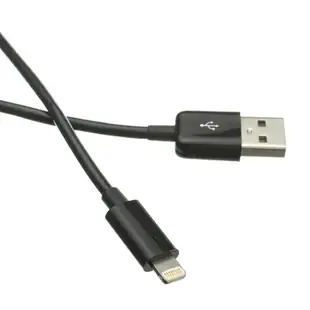
Apple Lightning Authorized Black iPhone, iPad, iPod USB Charge and Sync Cable, 3 foot
10U2-05103BK
- Length
- 3 ft
Check connector type, data support and charging rating separately for the exact item. Measure the installed route against this 3 ft length.
USB C to Lightning, Fast Charge & Data Sync Apple Products, White, 6 foot
10U2-25106
- Connector references
- USB C
- Dimensions in listing
- 6 foot


